
Gazzaladra
Gazzaladra18K followers
Follow
Gazzaladra
Gazzaladra
|
Image 1 of 12
Marshmallow table 3d model
Gazzaladra
Gazzaladra
|
Image 1 of 12
Marshmallow table 3d model
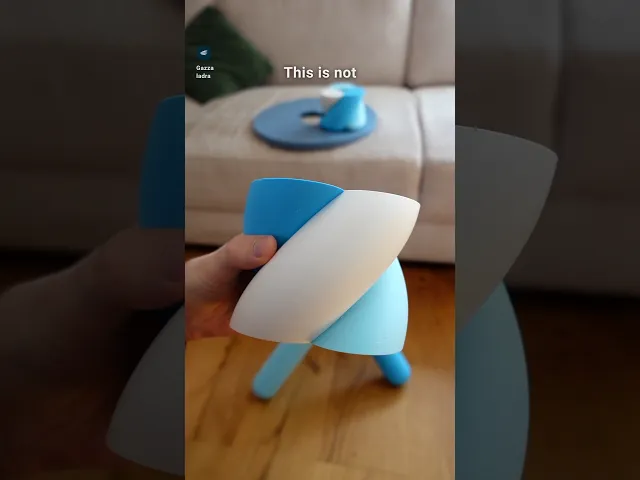
Marshmallow table video thumbnail
Marshmallow table 3d model

Marshmallow table

Subscribe for access starting at $6 USD
Get access to this model and 65+ more
This model is restricted by licensing terms. 

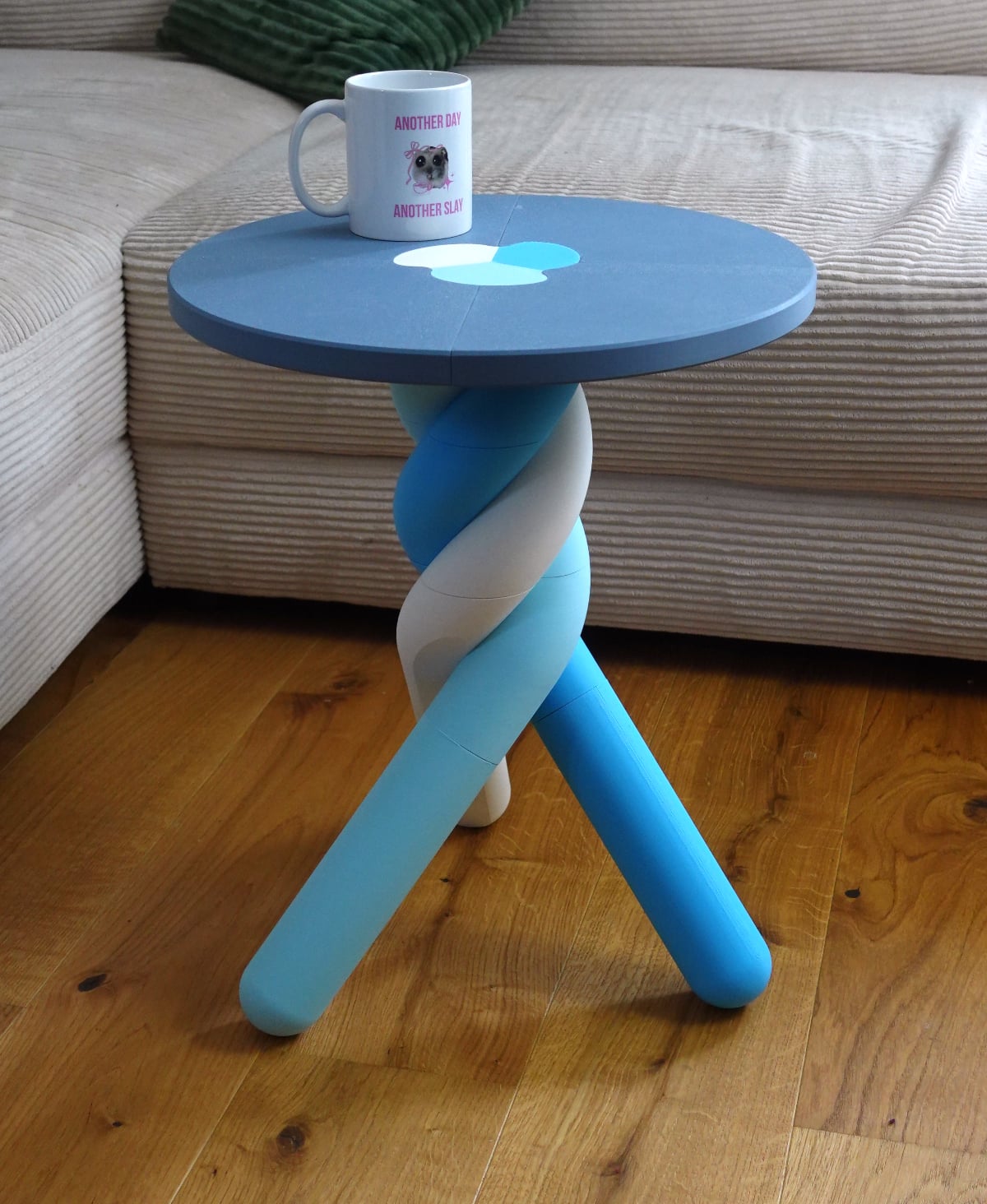
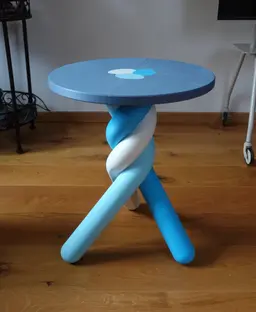
A fully 3d printed marshmallow inspired coffee table

Single and multi-color printing models are included as STL and 3MF! They work with all current and usual multi color setups.

Height: 50 cm Width: 40 cm

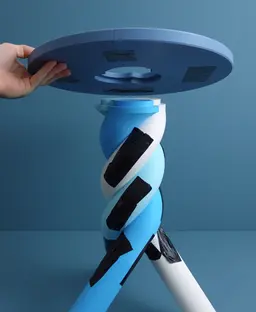
Instructions All parts are intended to be glued together! While the glue dries it makes sense to add a little duct tape to keep the parts together under pressure. Remove the tape after the glue dried.

  • Print all parts
  • Connect the three center pieces with the primary and secondary connectors
  • Add the leg connectors and legs
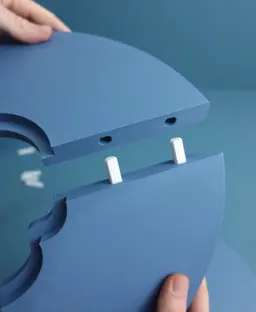
  • Assembly the top separately with the top connectors.
  • Add the finished plate to the center

I tested the assembly extensively and I can say that this design managed to support 80 KG when printed in normal PLA. These are my own personal results, and I do not advise using this as chair! This is a coffee table!

Print settings Required build volume: 200 x 200 x 150 mm – If you intend to print it on a plate smaller than 240 mm, you have to rotate the legs by 45 degrees to fit the plate Material usage: 2500 g

All parts beside the connectors need no special settings and your default profile will be enough.

Material: PLA Print direction: files are rotated correctly Support: none Nozzle size: 0,4 mm Line width: 0,4 mm Layer height 0,2 mm Infill: 15% Build plate adhesion type: none

Only the connectors need more robust settings 6 Walls 6 Top / Bottom layers 40% infill

Community Makes (2)
Very easy print, love how it turned out! Originally the top 4 pieces matched (2 and 2) but I failed to realize the tabletop part prints "upside down" so the part touching the bed is the color that will show when assembled. Using filler filaments for the bottom half led to some inconsistent coloring for me but that's on me! No issues with Bambu settings, love the turnout! (Little Jesus for scale)
Did one in black because, sadly, the printing files didn't come with pre-coloring. But I still loved it, and everything fit really great. I didn't have to change a single setting besides the support ones.
Very easy print, love how it turned out! Originally the top 4 pieces matched (2 and 2) but I failed to realize the tabletop part prints "upside down" so the part touching the bed is the color that will show when assembled. Using filler filaments for the bottom half led to some inconsistent coloring for me but that's on me! No issues with Bambu settings, love the turnout! (Little Jesus for scale)
Did one in black because, sadly, the printing files didn't come with pre-coloring. But I still loved it, and everything fit really great. I didn't have to change a single setting besides the support ones.


Community Makes (2)
Very easy print, love how it turned out! Originally the top 4 pieces matched (2 and 2) but I failed to realize the tabletop part prints "upside down" so the part touching the bed is the color that will show when assembled. Using filler filaments for the bottom half led to some inconsistent coloring for me but that's on me! No issues with Bambu settings, love the turnout! (Little Jesus for scale)
Did one in black because, sadly, the printing files didn't come with pre-coloring. But I still loved it, and everything fit really great. I didn't have to change a single setting besides the support ones.
Very easy print, love how it turned out! Originally the top 4 pieces matched (2 and 2) but I failed to realize the tabletop part prints "upside down" so the part touching the bed is the color that will show when assembled. Using filler filaments for the bottom half led to some inconsistent coloring for me but that's on me! No issues with Bambu settings, love the turnout! (Little Jesus for scale)
Did one in black because, sadly, the printing files didn't come with pre-coloring. But I still loved it, and everything fit really great. I didn't have to change a single setting besides the support ones.

Discussions
T
tsquaredprinting
Very easy print, love how it turned out! Originally the top 4 pieces matched (2 and 2) but I failed to realize the tabletop part prints "upside down" so the part touching the bed is the color that will show when assembled. Using filler filaments for the bottom half led to some inconsistent coloring for me but that's on me! No issues with Bambu settings, love the turnout! (Little Jesus for scale)
Very easy print, love how it turned out! Originally the top 4 pieces matched (2 and 2) but I failed to realize the tabletop part prints "upside down" so the part touching the bed is the color that will show when assembled. Using filler filaments for the bottom half led to some inconsistent coloring for me but that's on me! No issues with Bambu settings, love the turnout! (Little Jesus for scale) 3d model
 3d model
PrinterBambu Lab A1
Print bed sizeX: 256 mm; Y: 256 mm; Z: 256 mm
MaterialPLA
Layer height0.2 mm
Infill density15 %
Baran B
bzkrt101002
Did one in black because, sadly, the printing files didn't come with pre-coloring. But I still loved it, and everything fit really great. I didn't have to change a single setting besides the support ones.
Did one in black because, sadly, the printing files didn't come with pre-coloring. But I still loved it, and everything fit really great. I didn't have to change a single setting besides the support ones. 3d model
Gazzaladra
Gazzaladra

I will look into what happpend to those files! They should be colored!

Gazzaladra
Gazzaladra

i added a bambu studio version!

E
evanrgawiak

Keeps crashing my Bambu Studio when trying to open the multi colour print option, what slicer do you use / recommend?

Abel G
garciajr08

Same, keeps happing to me as well. using Bambu studio as well.

Gazzaladra
Gazzaladra

Oh damn, i will spinn up some bambu studio files asap!

Gazzaladra
Gazzaladra

Bambu studio version is included now!!

E
evanrgawiak

thank you so very much, I appreciate it a ton!!!

Y
yardenos0101

What are the names of the colors in the table?

Gazzaladra
Gazzaladra

That is Polymaker Panchroma Matt PLA in muted blue, sky blue, ice and cotton white!

Marshmallow table

313 downloads · 3 months ago in  and 
Gazzaladra
Gazzaladra18K followers
Follow
Subscribe for access starting at $6 USD
Get access to this model and 65+ more
This model is restricted by licensing terms.