Your Guide to Bundle
Everything you need to launch on Bundle, grow your audience, and share your designs with more makers.
Bundle is a simple way to share your work on Thangs, reach new makers, and start building momentum around your designs. Whether you're just getting started or already have an established catalog, Bundle helps more people discover your work while giving you the flexibility to publish on your own schedule.
Why use Bundle?
Bundle is designed to help you grow your audience and introduce your work to makers who may have never discovered you before.
With Bundle, you can:
- Reach a larger audience and gain visibility with new makers.
- Share models at your own pace, without the pressure of weekly releases.
- Build interest in your designs before launching a Membership.
- Learn what users enjoy printing by tracking downloads and analytics.
- Convert new Bundle users into long-term supporters of your brand.
If you don't have a Membership yet, Bundle is a great way to begin building an audience while generating revenue from your designs.
Prefer video? Watch our step-by-step Bundle tutorial here.
Bundle best practices
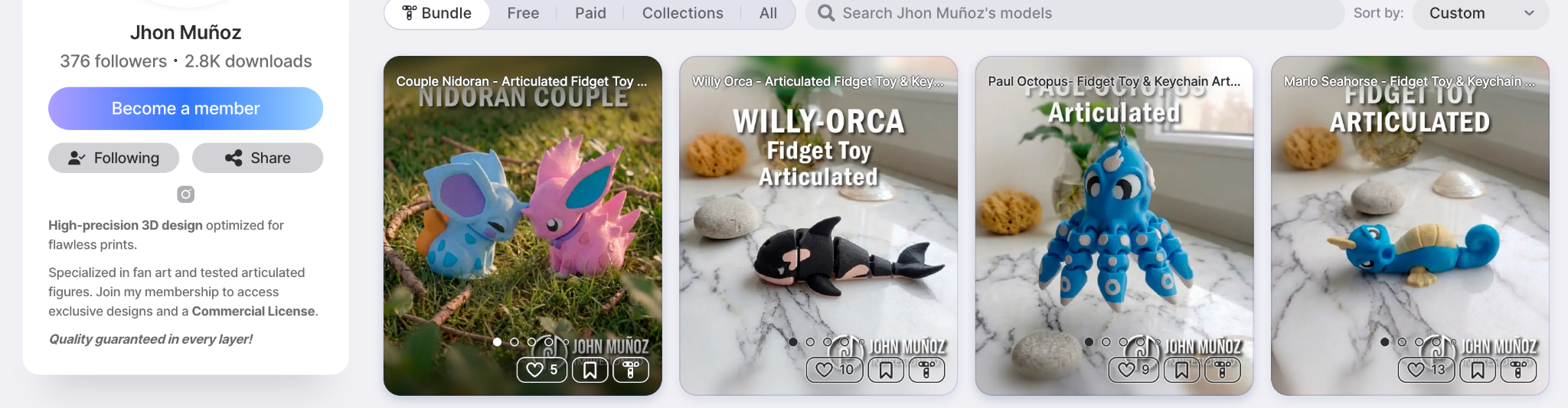
To get the most out of Bundle, we recommend:
- Start with 10–30 high-quality models that best represent your work.
- Avoid uploading your entire catalog; save some designs exclusively for memberships.
- Rotate models regularly to keep your Bundle fresh and encourage repeat engagement.
- Test every model for printability before publishing.
- Use high-quality renders and printed photos to help your models stand out.
- Make sure your descriptions, categories, and tags are accurate.
Step 1: Set up payments

Before publishing any Bundle models, you'll need to configure your payout information.
- Log into your Thangs account.
- Navigate to Settings → Monetization.
- Select Set Up Payments (or Initiate Payout if you've already started).
- Complete your payment setup.
- Return to Settings and begin the designer account review process.
Once approved, you'll be ready to publish Bundle models and receive payouts.
Step 2: Add models

After your account has been approved:
- Go to Profile → My Models → Manage My Plans → Bundle.
- Upload new models or assign existing models to Bundle.
- Edit your model page with descriptions, images, tags, and categories.
- Click Save & Publish.
Your model will immediately appear both on your profile and inside the Bundle catalog.
You can also drag and drop existing models into your Bundle plan at any time.
Step 3: Track your performance

Bundle performance is available inside your Analytics dashboard.
Navigate to:
Analytics → Designer Analytics → Commercial Insights → Bundle
Here you can:
- Monitor downloads for each Bundle model.
- Track Bundle earnings.
- Discover which designs perform best.
- Learn what categories users are most interested in.
- Gain valuable insights into your audience and members.
Use these insights to decide which models to feature next and what content resonates most with your community.
Step 4: Join the community

Have questions or want feedback on your designs?
Join the Thangs Discord community to connect directly with the Thangs team and fellow designers. It's the best place to:
- Ask questions
- Share ideas
- Receive feedback
- Stay up to date on new features
- Connect with other creators
FAQs
How do I add or remove models from Bundle?
Bundle participation is completely optional. You can add or remove models at any time under Manage My Plans → Bundle.
Where can I see my Bundle earnings?
Navigate to Analytics → Commercial Insights → Bundle to view your earnings and download activity.
How do Bundle payouts work?
Designers receive 50% of each Bundle subscription (minus processing fees). Each subscriber's contribution is divided equally among every creator whose models they downloaded during that billing month.
To reduce processing costs, Bundle payouts are issued once your earnings reach $10.
You can learn more about Bundle payouts and terms here.
How do we promote Bundle?

We actively promote your designs within Bundle through:
- Shopper email campaigns
- Social media
- Homepage and catalog promotion
Our goal is to introduce your work to new makers and help grow your audience over time.
Start Building
Bundle is one of the easiest ways to begin growing your audience on Thangs.
Share your best work, learn what makers love, build momentum around your brand, and turn first-time discoverers into long-term supporters.
Start with a handful of your strongest designs, keep your catalog fresh, and let Bundle help more makers discover your work.


