How can I organize my models?
To organize your models as a designer and speed up your file management process you can create folders in your MyThangs overview. Creating a folder structure can help you keep your files organized, but also help you quickly assign multiple models at once to membership plans and set their permissions as a bulk action.
Collections are a great way to organize your models so customers can easily browse your store or purchase multiple items at once. While regular users use Collections to share their favorite designs, designers can use them to create public-facing folders directly on their store page.
To get started, you can create a new Collection from your MyThangs page and customize it with a cover image, description, and tags. Simply set the Audience to "Public" if you want to use the Collection as a standard browsing folder, or choose "Marketplace" if you want to sell the models together as a bundle. Selecting Marketplace will automatically unlock the option to set a custom sale price for the entire set.
You can contact us at support@thangs.com and be sure to include the email address you use with Thangs and your username. Please include a summary of your issue and any screenshots if necessary. If you have questions about a purchase or billing issue, please include any relevant receipts and the last four digits of your credit card. This will enable us to assist you faster. Please allow 48 hours during working days for a response.
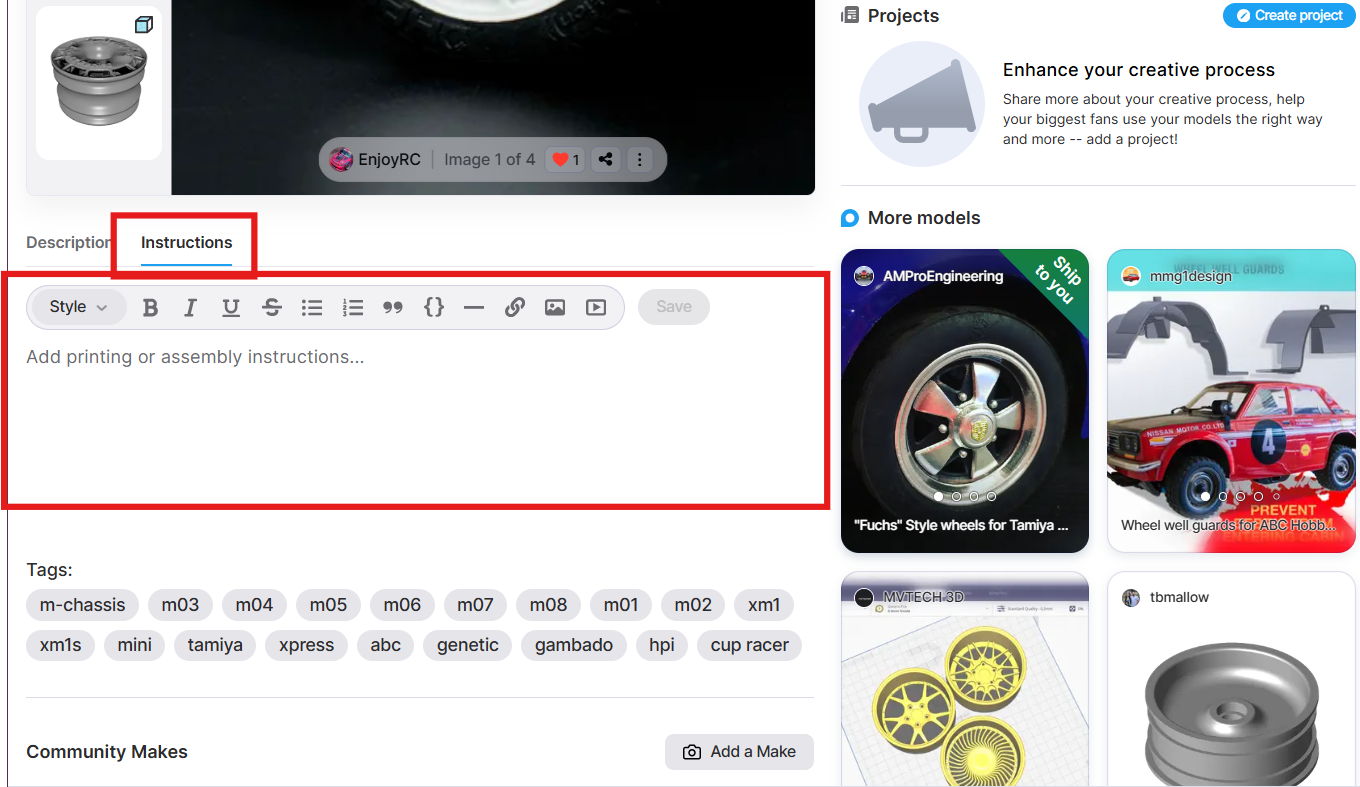
Share important info with your makers, right where they need it. Add print instructions to your model to help your customers have a great experience when they download your model.
- Find the instructions tab on your model page (right next to Description).
- Add printing tips, assembly steps, or any extra details you want.
- Edit instantly with built-in Style + Save tools.
- Embed images directly: add renders, final prints, or diagrams.
- Once model is downloaded, print instructions will automatically download as PDF.
It’s a faster, cleaner way to guide users and help them successfully print your designs all in one place.
You can enable membership credits to rollover month to month. This feature is an optional feature for designers to enable in their Plan Settings page.
Here’s an example of how rollover credit work:
- Customer A purchases a membership plan with 4 downloads a month
- They download 3 models during their billing cycle.
- Upon the next billing cycle renewal, their download credits will be 5 instead of 4, because they only used 3 in the previous month.
This can be set to a maximum, unlimited, or none and at each individual plan.
To enable this for your plans, visit thangs.com/mythangs/plan and then click Edit to modify the Download Limits section of your plan.
This feature is another way you can reward your long-term members and helpful for when they go on vacation or forget about their renewal date. This also will help offset some of the customer support we see regarding download quotas for long time members, retaining memberships for our designers
Designers set the final price you see when purchasing a model, which includes both manufacturing costs and their profit margin. Manufacturing costs are determined by various factors including:
- Material selection
- Material volume required
- Model complexity
- Post-processing requirements
How does the pricing breakdown work?
Below is a breakdown of how the pricing works on our platform:
If your order arrives damaged, please:
- Take clear photos of the damaged item and packaging
- Contact our support team within 48 hours of delivery
- Provide your order number and damage documentation
This will not only help us provide the best solution for you, but also make sure we can close the feedback loop with manufacturing and our logistics partner.
Please reach out to support@thangs.com from the email associated with your Thangs account and include your Thangs username so we can better assist you.
We offer reprints in cases where the printed model:
- Has significant manufacturing defects
- Shows quality issues that fall below our standard
To request a reprint, please contact our support team within 48 hours of receiving your order and include clear photos documenting the issue.
As this is a custom produced product for you we do not typically accept refunds or returns. However, we offer refunds under the following circumstances:
- If we’re unable to print your model due to technical limitations
- If the item arrives damaged or with significant quality issues
- Does not match the material specifications advertised
- If the order was canceled before printing began
Refunds typically are processed by our support team within 3-5 business days, it can take up to 10 days for the refunds to appear in your account.
If you would like to request a refund, please reach out to support@thangs.com from the email associated with your Thangs account and include your Thangs username, receipt, and any photos of the item so we can better assist you.
Yes, you can cancel your order before it enters production. Once manufacturing begins, cancellations are no longer possible. To request cancellation, please contact our support team with your order ID.
Current lead times vary by selected part size, material and finish:
- FDM Plastics: 6-10 business days
- SLS Plastics: 5-8 business days
- MJF Plastics: 5-10 business days
- MJP Plastics: 4-8 business days
- Cast Metals: 12-14 business days
These times represent production only and do not include shipping time, which depends on your location and chosen shipping method.
It depends on which country you will have your order shipped to:
- USA & EU: For the United States and European Union countries, we use DDP (Delivery Duty Paid) shipping, which means customs duties and import taxes are included in the price shown at checkout. This helps you avoid unexpected charges upon delivery.
- Rest of the world: For all other countries, import duties and other local fees are not included in the price and will depend on your country’s regulations. We highly recommend checking your local customs rules before placing an order to avoid any surprise charges.
We ship worldwide! Shipping costs and delivery times will vary based on your location.
For the United States and all EU countries, we use DDP (Delivery Duty Paid) shipping, which means customs duties and import taxes are included in the price shown at checkout. This helps you avoid unexpected charges upon delivery.
For all other countries, import duties and other local fees are not included in the price and will depend on your country’s regulations. We highly recommend checking your local customs rules before placing an order to avoid any surprise charges.
You can track your order at any time by:
- Logging into your Thangs account
- Navigating to “Order History” in the dashboard
- Selecting the specific order to view its current status
Each order progresses through several stages: Processing, Printing, Quality Control, and Shipping.
To manage your billing information, update your PayPal or Stripe details, or switch payment methods for a recurring membership, visit your Order History overview. From there, you can easily manage the billing settings for any of your active memberships.
Receipts and invoices for your orders and memberships can be downloaded from your Order History overview.
For individual download or print purchases you can click “View invoice” to download or print your invoice.
For membership you can click “Transaction overview” to view each monthly/annual payment. Click “View invoice” to download or print your invoice.
We accept major credit cards, PayPal, and various digital payment options. All payments are processed securely using Stripe and PayPal.
The Thangs.com Terms of Service are available to read here.
Content on Thangs must be appropriate for all ages and follow our content policy. While we carefully monitor our platform for spam and prohibited content, we also empower and rely on our community to help keep Thangs a great place to create and discover 3D printed designs.
Users can report content for the following reasons:
- Spam
- Unprintable content
- Copyright infringement
- Prohibited content including hate symbols, extremist imagery, weapons or items designed to cause harm, or drug paraphernalia
- NSFW content
- Misleading model, image, description, or categorization
- Plagiarism
To report a model use the report model button located on the model’s page under the three dots near the title. To request a model takedown, contact support@thangs.com. Please include links to the content you are referencing.
If you accept a percentage discount offer with a commitment period condition you will be able to cancel the membership at the end of the commitment period date. Memberships do not automatically cancel when the commitment period ends.
A retention package offers you a free membership to another designer in exchange for sticking with your original, paid membership for an additional 2 months. The memberships do not cancel after the retention 2-month retention package ends.
Refunds are not offered after renewal, but you will continue to have access to your benefits until the end of your billing cycle.
In order to protect our designers’ income, our policy is to not offer refunds, though we will allow for some exceptions where refunds are granted at our sole discretion.
You can cancel at any time by following these steps:
- Login to Thangs
- Click on your Profile Icon and then select Order History.
- Here you will be able to view all your previous and current memberships.
- Find the membership you wish to cancel. Select the Cancel Membership button. You will continue to have access to your benefits until the end of your billing cycle.
If you have accepted a retention package, a pop-up will appear to remind you of this and will indicate on which date your membership will cancel.
Note: Memberships purchased with Before You Go (50% OFF) discounts and promotional pricing are not able to be cancelled early to ensure we provide consistent service and support the growth of 3D designers
The original creators retain full copyright of their designs. Thangs takes design protection seriously. See our Terms and Conditions for details.
To sell prints you need a commercial license from a specific designer's membership. Not all designers offer commercial licenses. A commercial license is not included with the Bundle membership.
No. The Thangs Bundle is an opt -in program for creators; it allows you access to the models provided from the creators that have opted into the program; it will not give you access to all of the creators site wide.
Bundle is a membership that enables you to choose from thousands of downloadable 3D printable models from multiple creators, across different categories of Thangs.
Yes, if a designer has defined an upgrade or downgrade path for memberships. For upgrades they are effective immediately. Downgrades will take effect at the end of the billing cycle.
Membership downloads vary depending on the designers and plans they choose to offer. Higher cost plans often include exclusive content, early access, and personalized experiences depending on your plan. Memberships are creator-specific, not site wide.
You will be charged via auto pay on a monthly basis for your membership. Memberships auto renew until you cancel. You can cancel at any time.
Our membership pricing is determined by the designer offering that membership. It starts at $2 per month and varies depending on the designers and plans they choose to offer. Higher cost plans often include exclusive content, early access, and personalized experiences depending on your plan.
You can locate all your purchased memberships/models in the drop down menu on your profile under memberships when you are logged into your account.
We are here to help you. You can contact our customer support team by emailing support@thangs.com. Please allow up to 48 hours during business days for us to review and reply to your message. Please complete your email with your account information to assist us in your request.
Thangs designers (sellers) who offer memberships, and members (buyers) are both supported in the following countries:
- Argentina
- Australia
- Bahrain
- Belgium
- Bulgaria
- Canada
- Croatia
- Cyprus
- Czech Republic
- Denmark
- Estonia
- Finland
- France
- Germany
- Greece
- Hong Kong
- Hungary
- India
- Indonesia
- Ireland
- Italy
- Japan
- Latvia
- Lithuania
- Luxembourg
- Malaysia
- Malta
- Mexico
- Morocco
- Netherlands
- Oman
- Peru
- Philippines
- Poland
- Portugal
- Romania
- Singapore
- Slovakia
- Slovenia
- South Korea
- Spain
- Sweden
- Switzerland
- Taiwan
- Thailand
- Turkey
- United Arab Emirates
- United Kingdom
- United States
Most commonly, login issues occur when a user is not using the login method associated with their account (Apple SSO, Google SSO, Facebook SSO, or email). Please ensure you are using the appropriate login method.
If you have multiple accounts and prefer to have them all under one, please reach out to as at support@thangs.com. With your request, please provide the receipts for your most recent Thangs purchase on each account, all usernames, and which account you prefer to keep and we will be happy to assist you.
Even though we highly recommend using 2FA to secure your account, some email clients will reject these emails. If so, we recommend using another 2FA method to secure your account, such as an authenticator app. If you are having trouble, we can remove the 2FA requirement temporarily. To assist us in doing so and to confirm that you are the owner of the account, please email us support@thangs.com your request with the following details of your latest transaction on Thangs: Either the last 4 digits of your payment card or PayPal account and your Thangs username.
You can reset your password by selecting the option to reset your password on the login screen.
For growing designers:
- Selective, annual accelerator program for high-performing, high-potential designers.
- Thangs membership API available to exclusive sellers for a 1% platform fee increase.
- Designer education sessions to learn skills, tactics, and discuss with industry professionals.
- Responsive team support, tailored to your needs.
For professional designers:
- Dedicated account manager and white glove support.
- 2% platform fee reduction for high-performing designers making over $7,500 a month
- Additional 2% reduction if selling exclusively on Thangs.
- Custom API for model and membership management.
- Beta test new features and materials.
- Scaling support including retail support, manufacturing, and logistics.
- Individualized promotion plans and co-promotion opportunities like press releases and contests.
We curate a regular newsletter that goes out to all of Thangs customers that features designers and custom carousels and heroes across the Thangs website. We also regularly promote designers through our social media accounts. Want to collaborate? Add us as a collaborator on Instagram for a chance to be featured!
Thangs has partnered with Stripe to provide you with a seamless dashboard to manage your tax forms. To learn about your income tax forms and how to get them, see 1099 tax forms on the Stripe Support site.
Please note: The 1099-K filing threshold for the U.S. is 20,000 USD and 200 transactions for tax year 2025 according to the IRS, so you may not receive a tax form if your total memberships are under this threshold.
Yes, Thangs collects and pays sales tax in all 50 states and the appropriate VAT in European countries and all other jurisdictions. That means that designers don’t have to worry about taxes from their sales and can focus on designing and running their business.
For memberships, Thangs charges a 14% platform fee, plus additional fees to cover payment processing and currency conversion. For high-performing designers earning over $7,500 a month on Thangs we offer a 2% platform free discount, and an additional 2% discount if they sell exclusively on Thangs. For marketplace downloads and prints it can differ depending on the sales price you set. For a detailed breakdown of our fees, please see our terms and conditions.
On Thangs you make money from the first download. You can build your business selling digital files individually or through subscriptions, as well as offer your products to be printed on demand in premium materials through our Print Store.
Print quality varies by material choice. Most materials provide excellent detail resolution, but some have specific minimum feature size requirements. The material descriptions on our Technology & Materials pages include information about resolution capabilities for each option.
Upon upload, our system performs an automated check for file corruption, part count, and size limits. After you select a material and submit your model, we perform a manual geometry review. If our team identifies any structural issues, you’ll receive an email with specific details and suggestions on how to fix them before completing your order or continuing setting up your products.
We offer a wide range of materials through our partnership with Shapeways, including various plastics, metals, and specialty materials. Please take a look at our Technology & Materials pages.
For more detailed specifications, you can also visit Shapeways’ Materials page.
To organize your models as a designer and speed up your file management process you can create folders in your MyThangs overview. Creating a folder structure can help you keep your files organized, but also help you quickly assign multiple models at once to membership plans and set their permissions as a bulk action.
Collections are a great way to organize your models so customers can easily browse your store or purchase multiple items at once. While regular users use Collections to share their favorite designs, designers can use them to create public-facing folders directly on their store page.
To get started, you can create a new Collection from your MyThangs page and customize it with a cover image, description, and tags. Simply set the Audience to "Public" if you want to use the Collection as a standard browsing folder, or choose "Marketplace" if you want to sell the models together as a bundle. Selecting Marketplace will automatically unlock the option to set a custom sale price for the entire set.
Here at Thangs we take your rights to your creations very seriously, we will ensure that if you find a seller selling your creations on our platform we will require them to remove your model from their page and they could face a temporary or permanent ban from the site.
However, with outside platforms we do not have the ability to request a take-down for anything sold without your permission; that is something that you would be responsible to complete with the other platforms via their take-down request requirements.
Thangs supports most of the image file formats and resolutions you expect, such as .jpeg, .png, .gif, and more. We recommend approximately 620px x 756px images, to optimize for the Thangs landing page and designer profile page model cards. Please note that our content standards stipulate that images should match the model – if not the model could be flagged for removal.
Go to your MyThangs and click “Add New” or use the upload button at the top of the website to upload your first model to Thangs. Here you can choose to upload one or multiple files at once, with the option to group the files as a multi-part model.
Upload & Edit will direct you to the model editor, where you can add images, a description, tags, categories and more. We recommend adding a photo of a printed model and including important details such as the (minimum) dimensions and print instructions. Per default your models will be private.
Bulk Upload: As your brand grows or you migrate from another platform, you may need a more efficient way to manage your uploads. The Thangs Sync app allows you to speed up the process by uploading models in bulk and syncing them directly from your PC to your Thangs account.
For more information about what is and is not allowed to be shared on Thangs, please review our Content Policy.
As a designer, you can create up to five different membership plans to fit your business model. This flexibility allows you to offer separate Personal and Commercial tiers, set varying monthly download credits, or even split your design catalog across different plans. To help increase your revenue, you can also define clear membership upgrade and downgrade paths, making it seamless for members to move into higher-tier plans as they grow with you.
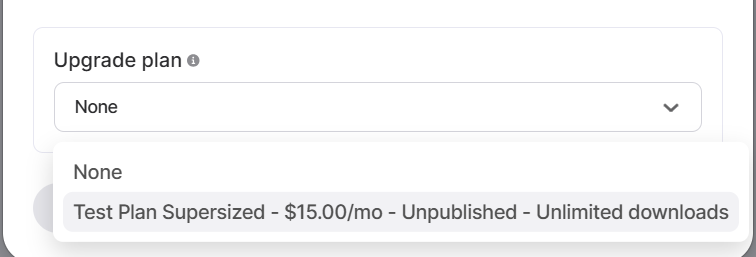
Set up your membership plan upgrade path by editing the lower tier membership plan and selecting the higher tier membership plan as the upgrade plan. The downgrade path is set automatically in the reverse order.
Note: Upgrade/downgrades are only available for download-based membership plans.
You can offer up to five membership tiers.
You can offer several styles of membership plan on Thangs:
- Downloads Plan: The most straightforward option. You set a specific number of download credits available to members each month. Subscribers can then "pick and choose" exactly which models they want to download from the model library assigned to this plan. This is the easiest to maintain plan, and perfect to combine with a commercial license.
- Monthly Releases Plan: Members get access to every model you release during the months they have an active subscription. You can customize this to include a set number of previous months' releases or offer a discount on one-off back-catalog purchases. This type of plan creates the most value for long term members and adds a sense of exclusivity to your designs.
- Chapter-Based Plan: This plan delivers a pre-set sequence of model sets. No matter when a member subscribes, they always start at "Chapter 1" and progress through your collection month by month. Ideal for tutorials, modular systems, or narrative-based designs.
Monthly vs. Annual memberships: To provide your members the best value, you can offer both monthly and annual pricing. Providing a discounted annual rate incentivizes members to lock in for 12 months, which in turn guarantees long-term income for you as a designer. Win-win!
It’s easy to get started selling on Thangs. Here’s how:
- Complete your profile: Add a short bio, photo, links to your social media accounts, as well as a fun header photo that captures the essence of your shop.
- Enable Stripe: Stripe is the payment processor we use to pay designers. You can set it up by going into your Store Settings under Manage Payments. This will open up the Stripe website for you to enter your details.
Submit your account: In order to monetize your designs, your account has to be verified. Once you have completed your profile you can submit your account for review from the Store Settings.
Fees differ for memberships, Bundle, individual model sales, and the Print Store:
- For memberships, Thangs charges a 14% platform fee, plus additional fees charged by our payment processor and currency conversion.
- For individual model sales Thangs charges a platform fee of 30% of total purchase price for less than $5, 20% of total purchase price for $5 and up to $10, and 15% of total purchase price for $10 and greater, plus additional fees charged by our payment processor and currency conversion.
- For Bundle Thangs pays designers 50% of the subscription fee, divided between designers an individual downloaded from. There are no additional processing fees.
- For the Print Store designers can set their own percentage and or mark up on top of the base price of the product.
For a complete breakdown of our fees please see our Terms and Conditions.
Thangs supports license file formats in plaintext, PDF, and markdown. Please read our Medium article here to learn how to add a commercial or creative commons license to your models or premium content.
Thangs.com supports the following file types: .3mf, .blend, .fbx, .glb, .gltf, .obj, .step, .stl, .stp, .usdz Note: .3MF, FBX, and GLB file formats are currently only supported as single part models. We plan on supporting assemblies in these formats very soon.
Bundle is a membership that gives users access to a massive library from a wide variety of designers. Participating is a great way to put your designs in front of new audiences and easily sell your work without the pressure of a recurring membership.
The Print Store allows you to diversify your offerings and expand your market far beyond the maker community by selling physical versions of your designs. It enables you to reach customers who do not have access to a 3D printer, and offer your products in a wider range of premium materials.
Thangs was designed to enable 3D designers to grow successful, sustainable businesses and multiple income streams. We know you have options of platforms, but with Thangs you can:
- Increase efficiency with built in 3D tools, including file management.
- Build your audience and revenue with sophisticated subscription offerings.
- Offer 3D printed products, produced on-demand in premium materials.
- Count on Thangs as a business partner - we provide customer service, VAT and sales tax management, and robust analytics.
- Experience a leading platform committed to designer success.
Thangs is a powerful platform for 3D product designers. We empower 3D designers to build businesses doing what they love and sell their 3D designs, whether digital files or products printed on demand in premium materials.
Thangs was created for 3D product designers like you to enable you to make money doing what you love. Joining will help you expand your reach, showcase your incredible work to a larger audience, and access more opportunities to monetize your creations.
Related articles
Get quick answers to our most common questions


