How to Share and Sell Your 3D Designs on Thangs
How to make money from your 3D models on Thangs.
Once your Thangs account is set up, you’re ready to start sharing your work with Thangs’ active community of 3D printing and designs enthusiasts. In this article we’ll walk through the different ways you can share your designs and—most importantly—start earning on the platform. With Thangs you can start earning from day one, as soon as you put your models up for sale.
How can I share my designs on Thangs?
You have multiple options to build your audience and your business on Thangs.
- Free Models: Share your designs publicly for anyone to download at no cost—perfect for building a following and showing off your skills.
- Marketplace Downloads: Sell individual models for a one-off fee. You control the pricing and can offer discounts to specific groups or members.
- Memberships: Build recurring revenue by offering members "pick and choose" access to your library and exclusive perks, such as commercial licenses to sell physical prints.
- Print Store: Reach customers beyond the maker community by selling high-quality, finished versions of your designs in premium materials not available on home printers.
- Bundle: A unique membership that gives users access to a massive library from a wide variety of designers. Participating is a great way to put your work in front of new audiences and a great way to monetize your work without the pressure of a recurring membership.
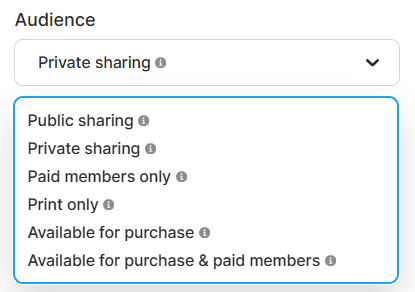
Choose your audience
To start sharing or selling your designs, you’ll need to select the correct Audience setting in the model editor. By default, this is set to Private.
- Public Sharing: Select this to share your models for free.
- Available for Purchase: Use this to sell your design as a one-off Marketplace download. Once selected, you can set your pricing and publishing dates.
- Paid Members Only: This limits access strictly to active subscribers of your membership plans. This also includes sharing the models in Bundle.
- Available for Purchase and Paid Members: This combines both methods—perfect for offering a "back catalog" of models that are available for individual sale or included in a subscription.
- Print Only: Choose this if you only want to sell physical versions of your models.
Note: If you want to offer physical prints in addition to digital downloads, you can also enable the Print Store option with any setting except Private Sharing.
Add models to Bundle
To opt in and add models to Bundle, simply navigate to Manage my plans and enable it from there. You can upload new models or add existing models to Bundle. Once a model has been added, it will automatically be available to all Bundle members.
We’ve now covered the various ways to share and sell your designs on Thangs, along with how to configure your individual models for each option. Now that you’ve seen how to monetize your work, it’s time to take the first step! Upload your first model today and set it to public to start sharing your designs with the community.
And as always, if you’d like to connect with us or other creators, please join our Discord channel! It’s the best place to share your progress and get direct support.


