

.gif&w=256&q=75)


Loot Twenty Expansion Pack
PRIVATE USE ONLY⚠️
Hi I'm Kelly! 👋 I'm a dog mom and aspiring 3D designer! These files are my intellectual property and the files CANNOT be shared, remixed or sold in any way. A Commercial License is Required to legally sell physical prints of my designs. 👉HERE is a link to my commercial license options!
DESIGN DESCRIPTION ✨🎲2️0️🎲✨
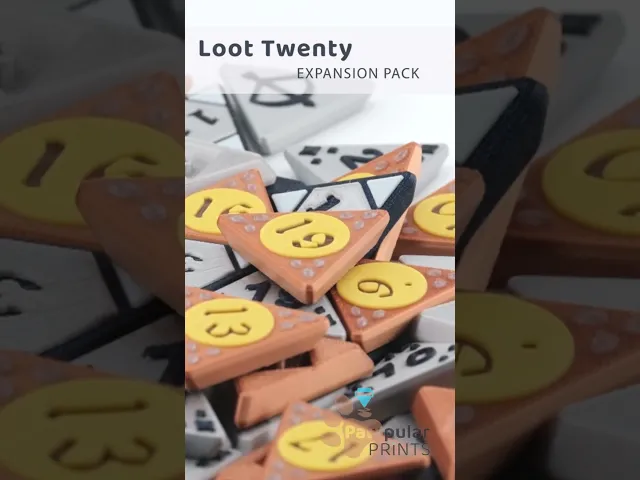
Hi Friends! While Nick has been hard at work on his latest dice designs, I took some time to revisit the Click Twenty. I've always loved offering variety in all of our clicker designs, and these dice models offer so many fun opportunities for customization—so I wanted to share a few new cap designs with you! There are three new numbered designs, a bunch of fresh symbols for the alternate 1 and 20 caps, and for those of you who prefer the rounded ball-style caps over the traditional dice, we’ve got some textured rounded cap options too (though those aren’t pictured!).
I’ve had a lot of fun playing with customizing these dice, and I hope you enjoy these new caps too! If you'd like to see more of this style—or similar caps for the other dice—let us know! ✨🎲2️0️🎲✨
This pack is an expansion pack of the original D20 offering decorative caps for customization. This pack offers 3 decorative patterns for numbered caps, 7 symbols that can be used as alternative 1s or 20s AND 4 rounded textured cap options. The numbered caps and symbols are offered in flat and raised variants!
CLICKER INFORMATIONℹ️
Like most of my designs, this is a clicky design that requires a mechanical keyboard switch to make the clicky part. These models feature a universal base design which has been tested with many keyboard switches and 99% of them work! I have an up to date list of verified clickers with links you can find HERE. This design should be compatible with most MX style keyboard switches, however, the two metal contacts on the bottom of the switch must be clipped off flush (or folded over) to ensure the switch seats properly in the base (this is a destructive process).
LICENSING⚠️
This is a PRIVATE USE ONLY license.
Commercial License options available 👉HERE
Sharing, sub-licensing, selling, renting, hosting, transferring, distributing, modifying, or remixing of any of the digital files contained in this design is NOT ALLOWED.
PHOTO COLORS🎨
- Ender White Flash
- Forge Burnt Titanium
- GeeeTech Silk Silver
- GeeeTech Silk Bronze
- Kingroon Yellow
3D PRINT SETTINGS⚙️
Layer Height: 0.2mm (recommended) External Perimeter: 0.33mm (recommended) Scale: 100% (Everything is modeled with tight tolerances and should not need to be resized) Orientation: Print the caps face down so you have a smooth surface for clicking! (recommended)
Note: I've found the best way to get the most crisp details on these clickers is to start with the smallest details first and work up from there. Here is the order I recommend after LOTS of trial and error:
- Small Detail (Dots, Eyes, Smaller Symbol Details)
- Medium Detail (Triangles, Numbers, Larger Symbol Details)
- Everything Else (Base Colors)
⚠️WARNING⚠️ - This pack requires very good bed adhesion to ensure the best possible results for your finished clicker. It is recommended to clean your bed with soap and water before printing or whatever your specific printer manufacturer recommends for a deep bed clean!
Stay Pawsitive! 🐾
For model help or other questions, please contact us at support@pawpularprints.com
Loot Twenty Expansion Pack

Prickly Pots

Rocket Pawps

Omni Cups Multi-Pack

Pan-Dumplings Multi-Pack

Jazzy 2.0 Heroes and Hoards

Directors Cut Multi-Pack

Jazzy Clicker 2.0 3-Motion Edition

Dual Tides

Alumni 2026 Multi-Pack

Summer 'Sicles Multi-Pack

Mallow Drama

Bouncy Blast Multi-Pack

Foul Firepower

Telly Tappers

Community Mod: Love Turtles by Buckle N' Shackle

Pasta Party Multi-Pack

Trunk Tappers Multi-Pack

Jazzy Clicker 2.0: Heart-to-Heat Multi-Pack

Turtley Yours Multi-Pack

Do you happened to have these in Bambustudio 3MF File, with correct settings, ready to print?
Hey there, generally we do 3mfs with default settings and recommend to change based on the above description as needed!
Thanks for the response! I just used the default settings that bambu has and the prints came out great!