




2x1x1 LU - Topped Rail - MultiBin Shell
“Multipoint Rail - Multibin Shells” are the most flexible type of Multibin Shell. They can be placed on a flat surface, connected with other Shells and attached to a Multiboard Tile, by using connectors like threads, magnets or Multipoints.
They can also be stacked, extended, divided and turend into a drawer collection.
Multibin Shells are paired with Multibin Inserts to create a “Multibin”. Multibin Inserts give the Shell the functionality to hold/organize specific items.
Bin Base:
- Multibin Shells can be placed on Multibin Panels (50 mm grids).
- They can also be placed on Base Plates , and further secured using Base Plate Bolt Lockers or 10x2 N52 Neodymium Disk Magnets.
- The Bin Base can also connect to a Multipoint to form a Drawer.
”Topped” Multipoint Rail Walls:
- Use the Rail Walls to connect Multibin Shells to other Shells using Bin-To-Bin Rail Connectors or Rail Pop-Ins.
- Use the Rail Walls to Connect a Multibin Shell to a Tile by using Multipoints or Rail Pop-Ins.
- This particular Multibin Shell has “Topped” Rails - Use Topped Rail Shells if you aren’t going to extend the height of your Shells in the future. If not then use “Full Rail” Multibin Shells.
Pin Holes:
- Corner Pin Holes: Used for locking external attachments (like Multibin Extensions or Lids).
- Wall Pin Holes: Used for securing Internal Dividers and Shelves.
Dimensions:
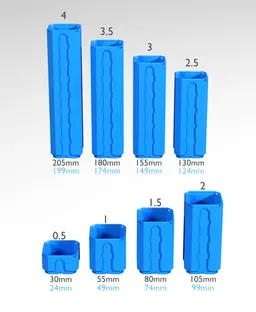
This Multibin Shell is 2x1x1 cells (100 mm wide, 50 mm long, and 55 mm high). Stacking a 1 cell high Shell on another Shell will increase its height by 50 mm.
The internal distance between walls is 94x44 mm. The total internal height is 49 mm (44 mm up to the top internal rim).
The Multipoint Holes on the Bin Base are directed towards the front (width) of the Bin.
Learn more about Multibins at https://multiboard.io/knowledge-hub
Printing Guidelines:
Use 3 perimeter wall thickness, 0.2 mm layer height, 15% infill, and no supports. Apart from that, use your printer's default settings.
The printing orientation is as provided in the file. Make sure the downloaded files are .STL. This part has been designed with a tolerance of 0.25 mm. Your printer will need to be able to bridge gaps of up to 30 mm for some designs.
For more information about printer settings, click here.
This object is part of Multiboard, a FREE and ridiculously modular organization system with thousands of parts, for creating the most adaptable workspace possible. Learn more and find ALL the parts at https://multiboard.io

2x1x1 LU - Topped Rail - MultiBin Shell

Fix Point to Countersink Adapter

Flush - Small Hole Center Marking Tool

6.25 Offset - Small Hole Center Marking Tool

12.5 Offset - Small Hole Center Marking Tool

2x6 MU - Right Support End - Modular Bolt-Locked Shelf

4x8 MU - Center - Modular Bolt-Locked Shelf

2x2 MU - Right Support End - Modular Bolt-Locked Shelf

2x6 MU - Left Support End - Modular Bolt-Locked Shelf

8x8 MU - Center - Modular Bolt-Locked Shelf

2x4 MU - Right Support End - Modular Bolt-Locked Shelf

4x6 MU - Center - Modular Bolt-Locked Shelf

2x8 MU - Left Support End - Modular Bolt-Locked Shelf

2x2 MU - Left Support End - Modular Bolt-Locked Shelf

8x2 MU - Center - Modular Bolt-Locked Shelf

8x4 MU - Center - Modular Bolt-Locked Shelf

2x4 MU - Center - Modular Bolt-Locked Shelf

2x8 MU - Right Support End - Modular Bolt-Locked Shelf

8x6 MU - Center - Modular Bolt-Locked Shelf

2x8 MU - Center Support - Modular Bolt-Locked Shelf

I needed to tweak this bin slightly to fit its intended contents. I have a Black&Decker laser level I wanted to put in a bin; a 2-wide bin was wide enough, but the level is 47mm front-to-back, more than the 44mm of the standard Multibin unit, so I cut two instances offset a bit from half depth, merged them to give me a bin that was 50mm deep, and printed that.