


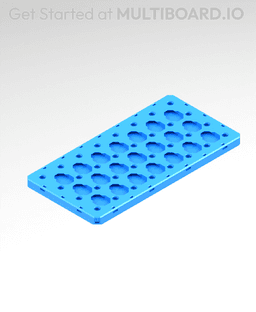

4x2 LU - Tray
Trays can be placed on Drawer Shells or on Bolt-Locked Brackets). A Multibin Panel can also be paced on top of the Tray.
This Tray is 4x2 cells (200x100 mm).
- Drawer Shells: Place the Tray on top of Bin Shells that are Horizontal (usually Drawers). Attach it using X Multipoint - Rail Pop-Ins
- Bolt-Locked Brackets: Attach the Tray to the Bracket using a Bracket-Multipoint Adapter.
Learn more about this part at https://multiboard.io/knowledge-hub
Printing Guidelines:
Use 3 perimeter wall thickness, 0.2 mm layer height, 15% infill, and no supports. Apart from that, use your printer's default settings.
The printing orientation is as provided in the file. Make sure the downloaded files are .STL. This part has been designed with a tolerance of 0.25 mm. Your printer will need to be able to bridge gaps of up to 30 mm for some designs.
For more information about printer settings, click here.
This object is part of Multiboard, a FREE and ridiculously modular organization system with thousands of parts, for creating the most adaptable workspace possible. Learn more and find ALL the parts at https://multiboard.io

Fix Point to Countersink Adapter

Flush - Small Hole Center Marking Tool

6.25 Offset - Small Hole Center Marking Tool

12.5 Offset - Small Hole Center Marking Tool

2x6 MU - Right Support End - Modular Bolt-Locked Shelf

4x8 MU - Center - Modular Bolt-Locked Shelf

2x2 MU - Right Support End - Modular Bolt-Locked Shelf

2x6 MU - Left Support End - Modular Bolt-Locked Shelf

8x8 MU - Center - Modular Bolt-Locked Shelf

2x4 MU - Right Support End - Modular Bolt-Locked Shelf

4x6 MU - Center - Modular Bolt-Locked Shelf

2x8 MU - Left Support End - Modular Bolt-Locked Shelf

2x2 MU - Left Support End - Modular Bolt-Locked Shelf

8x2 MU - Center - Modular Bolt-Locked Shelf

8x4 MU - Center - Modular Bolt-Locked Shelf

2x4 MU - Center - Modular Bolt-Locked Shelf

2x8 MU - Right Support End - Modular Bolt-Locked Shelf

8x6 MU - Center - Modular Bolt-Locked Shelf

2x8 MU - Center Support - Modular Bolt-Locked Shelf

Wish there was a parametric way to build these in any size I wanted
youtube video set to private, most of the links on this page down. I guess I can't complain since it's free but you gotta admit this whole system is a documentation nightmare.