


Deskimon - Charging Dock
560 downloads · 5 months ago · **⚡Deskimon — Charging Dock**
Charging your Deskimon should be simple.
The Deskimon Charging Dock m
⚡Deskimon — Charging Dock
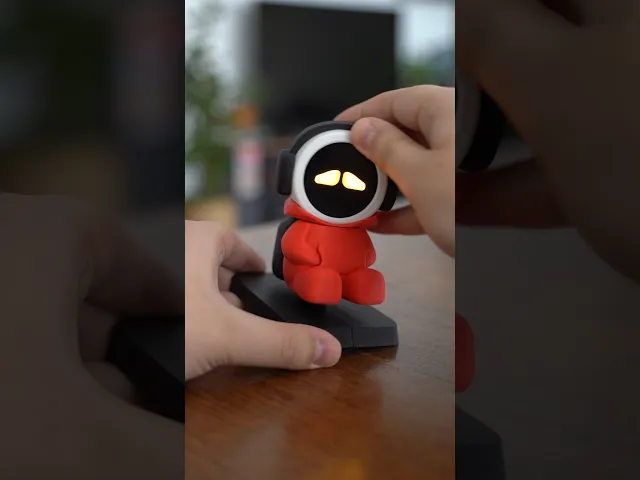
Charging your Deskimon should be simple. The Deskimon Charging Dock makes charging and updating your robot easy without having to take it apart or handle loose cables every time.
Just place your Deskimon on the dock — keeping your setup clean and convenient while your desk companion charges.
💡 Charging Dock Features
-
🔌 Simple USB Charging A standard USB cable is neatly routed through the dock and plugs directly into your Deskimon — no complicated setup required.
-
🖨️ Premium 3D-Printed Design All parts are optimized for smooth printing and easy assembly.
✨ Included with this Charging Dock
- 📐 Print-ready Charging Dock 3MF & STL files, organized and labeled
More characters coming soon, find the Deskimon on my page
Deskimon - Charging Dock
560 downloads · 5 months ago in and

GoQuest - Turn Life Into a Game
.gif&w=3840&q=75)
Deskimon - Neo
.gif&w=3840&q=75)
Deskimon - Poko

Pizza Case - for GoQuest/Deskimon

Deskimon - Cute Robots For Your Desk

Deskimon - Hopper

Master Control - One Disk To Control it All

Spooky Stand - The Scariest Controller Stand

Tea Tree - Foldable Tea Bag Stand

Tic-Tac-Grow - Foldable TicTacToe Plant Set

Mouse Grips - Switch 2 Accessories

Steering Wheels - Switch 2 Accessories

Dock Covers - Switch 2 Accessories

Shooter Grip - Switch 2 gun Accessory

Switch Blade - Switch 2 Accessories

SD Blade - Card Case

Dino Dock - Phone Stand

Vaulty Plant - Secret Vault Succulant Plant

Vaulty Plant Add-Ons

Which cable did you use? Because my connector is to large and deskimon is floating :)
I used a few different cables around the house, have not bought a specific one, but mine all seemed to work
Also interested in suggested cable, my standard USB-C cable is misaligned and doesn't plug in correctly
Buenas amigo me gustaría hacer tu proyecto soy d España madrid pero no encuentro la pantalla y de mas me podrías mandar los link para las piezas y de mas gracias
I can't for the life of me get the USB C cable to line up properly with NEO when I put him on the stand. Any tricks to doing this without breaking the USB connector on NEO. Yes, I know carefully. Any other ways?
Got it done
I want to ask you what other accessories I need to buy besides the ones I will print on my 3D printer, and where can I find them? Do you have any links, please?
Is my Deskimon supposed to be charging? Because whenever I plug it in, the battery always stays empty. And when I unplug it, it turns off. Is this normal, or am I having a problem?
When connected to usb C, it should be charging, what battery did you buy?