
Sunny Sky Fidget Toy | Clicky and Roller Ball
3 downloads · 5 months ago · Here's a sunny little fidget toy that fits right in your palm. It includes a clicky fidget in the su
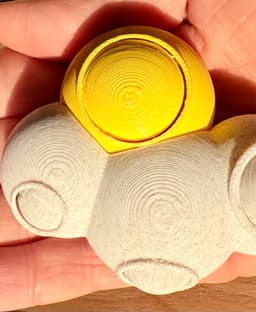
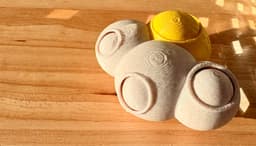
Here's a sunny little fidget toy that fits right in your palm. It includes a clicky fidget in the sun and three different rolling balls in the cloud part. The latter is print-in-place, but for the clicky part you will need a keyboard switch. I used Kailh, it snaps right in!
Print:
- The model files are seperated by colors, so no AMS / CFS etc. is needed.
- I suggest using supports. The cloud part should not be angled differently, since it might interfere with the rolling ball function.
- Use ironing for smooth finish
- I printed mine with 30% infill to give it a bit more weight. Play around with that setting to your liking.
Assembly:
- Clip off the little rods at the bottom of your keyboard switch - they block the snap fit.
- Press the switch into the cutout of the sun part. You should hear a snapping noise.
- Press the sun cap onto the switch. Add a drop of glue for extra adhesion if necessary, but make sure it doesnt block the switch.
- Plug the sun into the cloud.
- Push the cloud balls around a little bit to loosen them up.
- Click and roll away and enjoy your new sunny sky fidget!
I used HLModtechs Clicky Keychain Template to incorporate the right cutout for the Keyboard Switch (CC BY-SA 3.0) - thank you for providing this model! Do check out his content for helpful models and tutorials on Tinkercad.
This model is licensed under [CC BY-NC 4.0](https://creativecommons.org/licenses/by-nc/4.0/)
Sunny Sky Fidget Toy | Clicky and Roller Ball
3 downloads · 5 months ago in and

Sky Duos

Sunny Wall Sculpture Model 3D Print Model

Cute Clicker Sky Collection | No AMS | Print-in-place | Support-free

Fried Egg Buddy Clicker + Keychain
Bundle

Sun Shape Cutter, Cookie & Fondant Tool, 18-Piece Set, Various Sizes, Weather & Sunshine Themes PRODUCT_120

sunflower wall art sun flower wall decor 2d art

Griffin - Bouncimal

Mermaid Sun Catcher

Six Seven - FREE Meme Clicker

Sky Buddies

Click Ten

Click Starter Ultra-Pack

Squish Ball Print in Place Fidget Toy
Darth Vader - Starwars - 30cm Fanart

Ornate Nutcracker - FREE Christmas Kit | No Supports, No AMS, No Glue
Happy Lil Reindeer

Clicky Cacti - Fidget with Mechanical Switches - Pocket Plants
Spinny Succulents - Mini Fidget Spinners - Pocket Plants Collection

Ghostly Campfire - No supports or AMS - Tea Light