


.png&w=256&q=75)



Gourd Gambit - Chess Expansion Pack for Gourd Games
Instructions Hardware Filaments
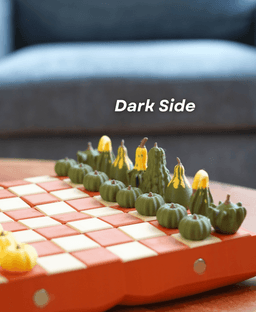
Gourd Gambit - Intermediate The best chess set for the fall. Pumpkin pawns, and gourd chess pieces. Each piece is magnetic so it sticks to the board.
This design is an expansion pack for Gourd Games. A pumpkin themed board game set. Make sure to download Gourd Games to use this chess set.
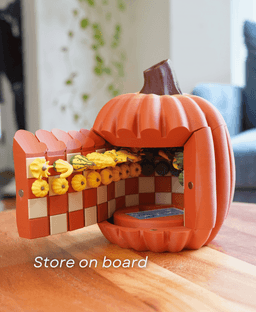
Super cool Storage The chess pieces store inside the pumpkin on the board all the pieces are magnetic, so they stick to the board. Roll up the board with the pieces on it, and store it in its pumpkin form.
How does it work? Each piece will need 1 magnet. The magnets are embedded into the prints by using a pause print. A pause print is where the print will pause part way through, so you can put magnets inside. Then the printer will seal the magnets in place. This pause print is already set in the file when you download.

Gourd Gambit - Chess Expansion Pack for Gourd Games
Projects

PlayBook'd LUDO

Cactus Cluster

PlayBook'd Tic Tac Toe

Lucky Bamboo Mahjong

PlayBook'd - Go

Telephones Booth

Spinny Succulents - Pack III

Desktop Golf Gen 2

PlayBook'd - Playing Cards

Desktop Dumpster

PlayBook'd Cribbage

PlayBook'd Crosswords

Snack Attack - Gen 2

PlayBook'd Snakes and Ladders
.png&w=3840&q=75)
Date Night Daisy

PlayBook'd Settlers' Storage
Scoopy Stacks

Butterfly Fridge Magnets - Pack II

Playbook'd - Checkers

Hi, we used painted supports of those pieces when we saved the file. When you split the pieces you want to be sure that you go into support settings and change the support type to "tree (auto)" and select "on build plate only" or repaint the supports using the support painting tool on the top tool bar of Bambu Studio. That way supports don't generate in the magnet holes on the inside.
I was able to get it to work with what you suggested, thanks!
Did you have success with Tree(auto) & Build plate only, or repainting the supports? The Tree &BPO did not work for us. My kids were hoping to demonstrate this model as part of a panel discussion they've been invited to at our local Maker Faire next weekend, so please let us know if anyone has figured out a solution for the knight gourds :) Many thanks for all these ingenious and fun models and the support of this community!
I am having the same issue as above. I cannot get supports on the knight pieces. I really don't want to print the whole plate again and have them fail again. Even with the support setting set as you stated above I am not getting any supports generated for the knight pieces. Painting tool has not been successful either.
We will take a look and see what can be done. Thank you for bringing it to our attention
This is so awesome!
I'm so glad you like it! Thank you!
Thank you. I just finished printing this. It looks great. The 3mf file has the stems white vs your photos have the stems green. I think the white great. Additionally, within minutes of finishing the print one of the bishops fell and the stem broke. The stems are very delicate, I don’t know if there is a fix for that. Maybe - version without stems?
I’m glad to hear your print turned out great! If you open the 3MF file in Bambu Studio, the stems should appear as brown by default, but you can change them to any color you like in the slicer. For the stem breaking, I’d recommend checking your filament settings and maybe increasing your print temperature or slowing down the outer wall speed a bit to improve layer adhesion as they usually shouldn’t break from a small fall. If you need additional suggestions, let me know. I am happy to help!
How many magnets do you need in total:)
You need 32 magnets for these chess pieces
How do I break up the pieces? I’m new to Bambu studio. I printed one set and my knights failed so I stopped the print. But everything printed successfully excepts knights, king and queen. I figured out how to delete the items I didn’t need but didn’t figure out how to separate pieces.
You can separate the pieces by right clicking on the objects and selecting "split". That should help. Just be sure that you have supports turned onto (auto)tree with "on build plate only" selected or you can repaint the supports on the knights by using the support painting tool on the top tool bar.
I'm not sure if it has happened for anyone else, but the 3mf file has the kings base as a tiny speck, then the second layer is mostly a floating region. When split into parts, it goes away. Not a huge issue, just something you may not be aware of. Love all your work, big dawg! Keep it up!
Hi, Thank you so much for bringing this to our attention. We appreciate the support! This issue has been fixed! The download should be updated now if you'd like to re-download (re-downloads don't count against monthly downloads)
Why can I not add supports when I break the models up from one piece to the individual objects? They won't register needing supports and it's quite frustrating.
Hi! I completely understand how that can be frustrating. For this set, the supports are pre-painted, so if you’d like to separate the pieces, you’ll need to enable “Automatic Supports” under the Support tab or manually repaint them in Bambu Studio. You can do this using the “Support Painting” tool at the top of the slicer. I hope this helps!