




Blob Noodlers - Flexi Snapping Fidget Art Toy and Phone Stand
BLOB NOODLERS
IMPORTANT: Adjustment may be needed based on your printer, please read the instructions below
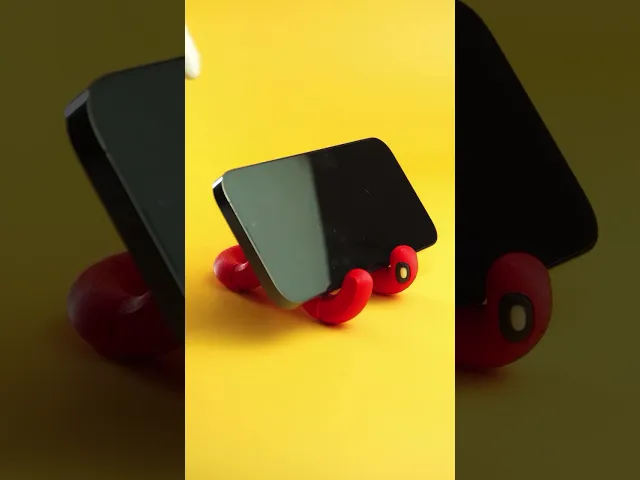
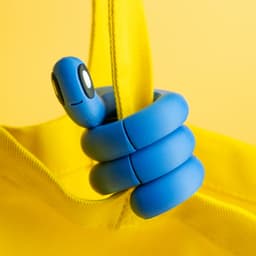
Noodlers are cute little worm-like fidget toys that you can.. well.. noodle with! The joints rotate and snap in place to allow you to position Noodlers in a variety of different ways. You can twist two together and watch them spiral around each other, or you can weave them through your fingers. Noodlers can also be helpful! Turn a Noodler into a phone stand or a bag hook, and when you're finished noodling just wrap it around your bag or belt loop. There's even a bumpy Noodler and short Noodlers for whatever vibe you may be feeling.
Features
- rotating joints
- snaps to different positions
- phone stand feature
- bag hook feature
- print in parts or multicolor
Noodle Types
- normal
- bumpy
- short normal
- short bumpy
PERSONAL USE ONLY
Purchasing or downloading this file does not give you the right to sell physical prints of this design. Commercial license is available for this design by subscribing to patreon.com/bloblab
COPYRIGHT PROTECTED FILES
All Blob Lab designs are protected under copyright law. Your purchase does not give you the right to sell or distribute the digital files in any way.
FILAMENTS
If you'd like to purchase the same filaments used in this design, please check out the Blob Lab Amazon Storefront affiliate link amazon.com/shop/bloblab3d
PRINT INSTRUCTIONS
- .12mm layer height recommended for high quality
- 3 + perimeters for joint strength
- print without supports aside from custom support piece under head (you can remove by right clicking and split to objects if you prefer to adjust)
- recommend to print at 210 C or cooler to keep joints from fusing
- after printing wait until the print cools down completely then gently twist to loosen joints
- if joints are too tight adjust the X-Y contour compensation by -0.1 mm
- print all parts on their flat side
- eyes snap into head, use superglue if too loose, scale parts or adjust X-Y compensation if needed
- 3MF files are for color information only, print settings may need to be adjusted
Blob Noodlers - Flexi Snapping Fidget Art Toy and Phone Stand

Blob Sloth - Flexi Articulated Art Toy with Tree Display

Space Blob Moxi - Mini Playset Art Toy with Modular Box

Space Blob Noz - Mini Playset Art Toy with Modular Box

Space Blob Zeek - Mini Playset Art Toy with Modular Box

Blob Butterflies - Magnetic Modular Art Toy with Log Container
Zorbles - Ultimate Squishy Clicker Fidget with Carrying Case

Blob Octopus - Flexi Articulated Art Toy with Magnetic Ink Display and Crab

Blob Beetles - Mini Modular Art Toy with Log Container

Blob Plants - Desert Series - Mini Plant Collectible Art Toy with Skull Container

Blob Monkey - Flexi Articulated Art Toy with Magnetic Branch

Gingerbread Blobs - Mini Modular Articulated Art Toy

Snowblobs - Mini Modular Articulated Snowman Art Toy

Blob Snowflakes - Ornament Art Toy

Blob Plants - Mini Plant Collectible Art Toy with Pot Container

Blob Flowers - Mini Plant Collectible Art Toy with Watering Can

Blob Skeletons - Mini Modular Articulated Art Toy

Blob Rocks - Prehistoric Series - Mini Rock Blind Box Collectible Art Toy

Blob Mushrooms - Mini Mushroom Collectible Art Toy with Stump Holder

Pocket Blob Mushroom Forest - Mini Playset Art Toy with Latching Case
Thanks it works now
I tried to print it but it did not move and instead broke.
try adjusting the x-y compensation to the settings in the photo