

.png&w=256&q=75)
Fix Point Bolt-Locked - 0.5 LU Bin Fit - OI Fold-In Locked Lite Rail (0.5 MU Rail)
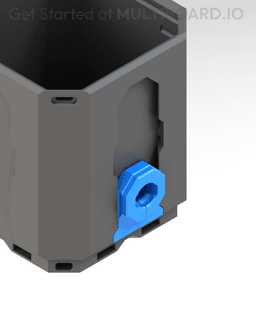
"Rail Pop-Ins" securely attach to the Rail Slots of Multibins by unfolding and "popping" in to place. Unlike a Rail, Pop-Ins will not slide off.
This is an "OI" Pop-In, which represents its shape and length (Look at the images to understand). "OI" Pop-In's are designed to fit 0.5 cell high Bins.
This Pop-In has one "Bolt Lock" at the front (O) that can be inserted into a Multiboard Snaps (Weight Bearing Snaps are recommended) and onto a Multiboard Tile. "Bolt-Lock" the Snap onto the Pop-in by screwing in a Lite Multipoint from the back of the Snap, this way the Pop-In won't slip out.
Learn more about this part at https://multiboard.io/knowledge-hub
Printing Guidelines:
Use 3 perimeter wall thickness, 0.2 mm layer height, 15% infill, and no supports. Apart from that, use your printer's default settings.
The printing orientation is as provided in the file. Make sure the downloaded files are .STL. This part has been designed with a tolerance of 0.25 mm. Your printer will need to be able to bridge gaps of up to 30 mm for some designs.
For more information about printer settings, click here.
This object is part of Multiboard, a FREE and ridiculously modular organization system with thousands of parts, for creating the most adaptable workspace possible. Learn more and find ALL the parts at https://multiboard.io
Fix Point Bolt-Locked - 0.5 LU Bin Fit - OI Fold-In Locked Lite Rail (0.5 MU Rail)

Fix Point to Countersink Adapter

Flush - Small Hole Center Marking Tool

6.25 Offset - Small Hole Center Marking Tool

12.5 Offset - Small Hole Center Marking Tool

2x6 MU - Right Support End - Modular Bolt-Locked Shelf

4x8 MU - Center - Modular Bolt-Locked Shelf

2x2 MU - Right Support End - Modular Bolt-Locked Shelf

2x6 MU - Left Support End - Modular Bolt-Locked Shelf

8x8 MU - Center - Modular Bolt-Locked Shelf

2x4 MU - Right Support End - Modular Bolt-Locked Shelf

4x6 MU - Center - Modular Bolt-Locked Shelf

2x8 MU - Left Support End - Modular Bolt-Locked Shelf

2x2 MU - Left Support End - Modular Bolt-Locked Shelf

8x2 MU - Center - Modular Bolt-Locked Shelf

8x4 MU - Center - Modular Bolt-Locked Shelf

2x4 MU - Center - Modular Bolt-Locked Shelf

2x8 MU - Right Support End - Modular Bolt-Locked Shelf

8x6 MU - Center - Modular Bolt-Locked Shelf

2x8 MU - Center Support - Modular Bolt-Locked Shelf

Needs to be updated to the new bolt lock?
Not sure how this is supposed to work. The moment the point bolt puts a bit of pull strength on this, it folds and gets off the bin. It should just slide in.
I glued mine in. Problem solved
doesnt actually hold my Multibin, not sure why. tried using a heavy load snap aswell as regular.