


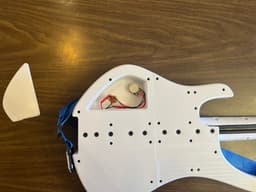


ExoBass - Wing Sets - CW2
Part of the ExoBass project — full catalog, build planner, and assembly guides at https://exobass.com
Plan Your Build & Get HardwareExoBass can be confusing! Head over to our build planner to plan your entire build - it'll walk you through every available part and handle compatibility along the way, and it covers all ExoBass parts. It's also the best way to get hardware, since it lets you buy everything for a full build in one go, not just this part.
You can find this specific part, ExoBass - Wing Sets - CW2, on our site.
Step 1: Heat set inserts Step 1a: Insert strap connector heat set insertsUsing a soldering iron, insert the Strap Connector Heat Set Inserts.
Step 1b: Insert pickup mount heat set insertsℹ️ This is optional, if you don't want to use the Over String Pickup Mount or the Lace Ultra Thin Pickup you can skip this step.
Step 2: Put together body piecesPrinted parts come with built-in supports at a few overhangs — clip and clean these out before assembly, particularly around the truss rod access notch and the neck pickup route.
Position the top pieces on top of the back pieces.
Step 3: ScrewsThen screw it all together using the BT3x20 screws
Step 4: Attach Core Step 4a: Position 2020 Step 4b: Insert T Nuts Step 4c: Attach body to T nuts with screws Step 5: Control Panel Step 6: Electronics Step 7: Close Control Panel Step 8: Strap ButtonsPut together the Strap Mount assemblies (heat-set insert + Strap Button) at the top and bottom of the body before moving on.
Step 8a: Install top Strap Button Step 8b: Instal bottom Strap Button Step 9: Install Pickup (Optional)Heavy Metal Core builds: use the Strap Connector heat-set inserts you installed in Step 1a for these mounts.
- Install Ultra Thin Lace Pickup
- Install Over String Pickup Mount
You can order a DIY kit for your entire build from our build planner, the estimate for this part's kit is $8.68 plus shipping.
Self SourceIf you want to order the parts yourself, here's a list. Estimated cost: $75.98.
ExoBass - Wing Sets - CW2

ExoBass - Head - Loop

ExoBass - Head - Headless

ExoBass - Head - VaiTality

ExoBass - Neck - Neck v4

ExoBass - Nut - Adjustable Nut

ExoGuitar - Face Plates - Acoustic v2

ExoGuitar - Wing Set - Shield

ExoGuitar - Neck - Neck v4

ExoBass - Wing Sets - Axe

ExoBass - Wing Sets - Spirited

ExoBass - Head - Knife's Edge

ExoBass - Wing Sets - VaiTality

ExoGuitar - Bridge - Arch Top

ExoGuitar - Wing Sets - Surfer

ExoGuitar - Bridge - Shredder

ExoGuitar - Bridge - Rocker

ExoGuitar - Anchor - Trapeze

ExoGuitar - Head - Firebird v2

ExoGuitar - Head - Arrow v2
