


Industrial Construction Set - FDM
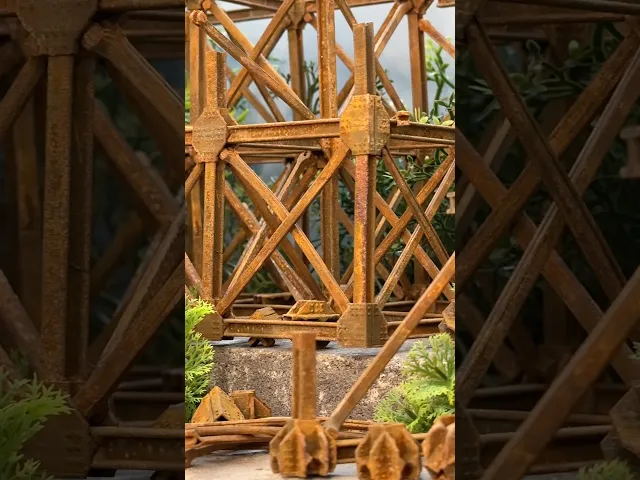
This 1:50 scale Industrial Construction Set is designed for FDM printing. Download includes “I” Beams, Crossbeams and Connectors.
“I” Beams insert into vertical and horizontal connection points on the connector. Crossbeams attach diagonally to connectors by snapping into the slot above and below the horizontal “I Beam” connection points.
All connectors must be printed in “spiralized” mode in order to have the proper connection openings for “I” Beams. “I” Beams and Crossbeams can be printed in either standard or spiralized mode but will look better and be stronger if printed in spiralized mode..
Terminal Connectors have a flat bottom and are used along with “I” Beams to build the foundation and cap the top. The number in the file name indicated the number of horizontal “I” Beams it connects to. There are two versions of “2 Adjacent” to accommodate the two corner configurations.
Connectors have a built-in raft that can be removed after printing. They have opening at the top and bottom to accommodate two vertical “I” Beams. The number in the file name indicated the number of horizontal “I” Beams it connects to.
The “I” Beam has a built-in raft that can be removed after printing.
The Crossbeams are designed to fit tightly into the connectors. Depending on the material and machine you are using you may need to file or sand the connect surfaces to allow them to snap into the connector more easily.
The model pictured is printed with Protopasta Iron-filled Metal Composite PLA and allowed to rust after printing.
Industrial Construction Set - FDM

Large Mizu Gumi Picture Stands

Small Mizu Gumi Picture Stands

Bouali Strange Attractor Sculpture

Aizawa Strange Attractor Sculpture

Bio Blob

Flame Lamp

Crystal Lamp
Fidget Ouchies
Tooth Fairy House

Crystal Citadels

Shack Pack - Sober

Shack Pack - Tipsy

Shack Pack - Plastered
Hole Through a Hole in a Hole

Holder for Reusable Straw

Stellar Blooms
Bump Boxes

Cut Crystal Eggs - Set 2
Cut Crystal Eggs - Set 1
any thoughts on how to print these at 200% (or any other increase)? The Ibeams scale up easily, and can be filled, but the terminals, since theyre designed for spiral mode, i dont think will scale up properly,
Could they be adjusted to have the socket in the model? or is there a way you know of to accomodate that in the slicer?