.gif&w=3840&q=85)
.gif&w=256&q=75)






Bella – The Butterfly Money Gift Box
309 downloads · 1 year ago · 🎁 **5 MONTHS FREE with annual plans** - Save 42%
---
### **Bella – Secret Compartment Butterfly �
This model is restricted by licensing terms.
View license.
🎁 5 MONTHS FREE with annual plans - Save 42%
Bella – Secret Compartment Butterfly 🦋🌸
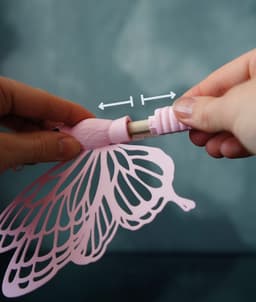
Meet Bella, the enchanting butterfly that not only adds a magical touch to bouquets, pots, or desks—but also hides a secret! Inside her belly is a tiny compartment perfect for money, notes, or little surprises. Beautiful in both single-color and two-tone styles, Bella is as charming as she is clever.
✨ Choose Your Style:
- 🍦 Single-Color Bella: Simple, elegant, and easy to print
- 🚀 Two-Tone Bella: Striking wing accents with a quick filament swap
😊 Why You'll Love It:
- 🦋 A stunning butterfly that feels alive with bent wings
- 🎁 Hidden compartment for money, tiny notes, or special surprises
- 🌱 Includes a stick-cap option—perfect for bouquets and plant pots
- ⚡ Easy to print
- 💝 Makes a delightful and meaningful gift
📐 Quick Specs: Fits rolled or folded notes (up to 83 mm × 8 mm) | Works with Euro • USD • GBP
🎨 Filament Used: White PLA (Get it) • Gold Silk PLA (Get it) • Pink Matte PLA (Get it) • Blue Glow-in-the-Dark PLA (Get it)
📋 Print Settings: See included README.md for detailed instructions
🎯 New to 3D Printing? Perfect prints guaranteed → Start Here
Bella – The Butterfly Money Gift Box
309 downloads · 1 year ago in and
This model is restricted by licensing terms.
View license.

PoopPal Corgi - Dog Poopbag Dispenser

Bruce, the Flexi Shark - Magnetic Hand-Holding Companion
Flexi Sloth Branch Dock
Sea Dive Pals

Domino — Dog Treat Edition

Alfie, the Flexi Alligator - Magnetic Hand-Holding Companion

Diego, the Ice Pint Holding Dragon
Sushi Stack — Shoji Box
Sushi Stack — Tumble Tower Game

Luisa, the Flexi Lioness - Magnetic Hand-Holding Companion

Highland Cow Desk Organizer

PMS - Period Missile System - Tampon Pistol

RummyCat - Rummy Game

Taro, the Flexi Tiger - Magnetic Hand-Holding Companion

Egglings – Dinosaur Egg Cup

Sammy, the Ice Pint Holding Sloth

Henriegga – The Chocolate Egg-Laying Chicken
Frankie, the Flexi French Bulldog - Magnetic Hand-Holding Companion

Chonkers Rabbit

I cannot get this file to open. I would like to delete it and select another one from your designs. I am only able to use STL files and really don't know how to convert 3D models. Very disappointing.
Hello, The Download of this File includes both. The 3mf file (Model with Settings) as well as an *.zip File with all the STLs (only the Model). If you prefer do use your own settings, or a different Slicer than Bambustudio you need to use the provided STL Files.
But in general i recommend to stick with the 3MF whenever possible—it’s already colour-correct and pre-tuned for printing.