





Stanley the Drink‑Snapping Shark
1.3K downloads · 1 year ago · 🎁 **5 MONTHS FREE with annual plans** - Save 42%
---
### **Stanley the Drink-Snapping Shark 🦈🥤*
This model is restricted by licensing terms.
View license.
🎁 5 MONTHS FREE with annual plans - Save 42%
Stanley the Drink-Snapping Shark 🦈🥤
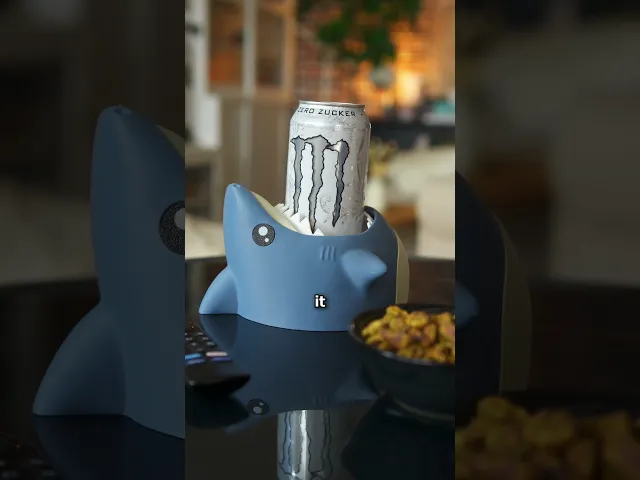
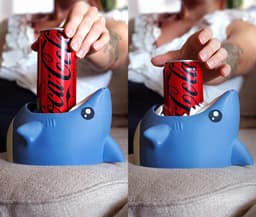
Meet Stanley—the shark that bites your drink so you don’t have to!
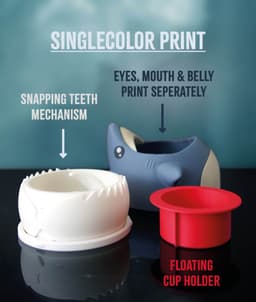
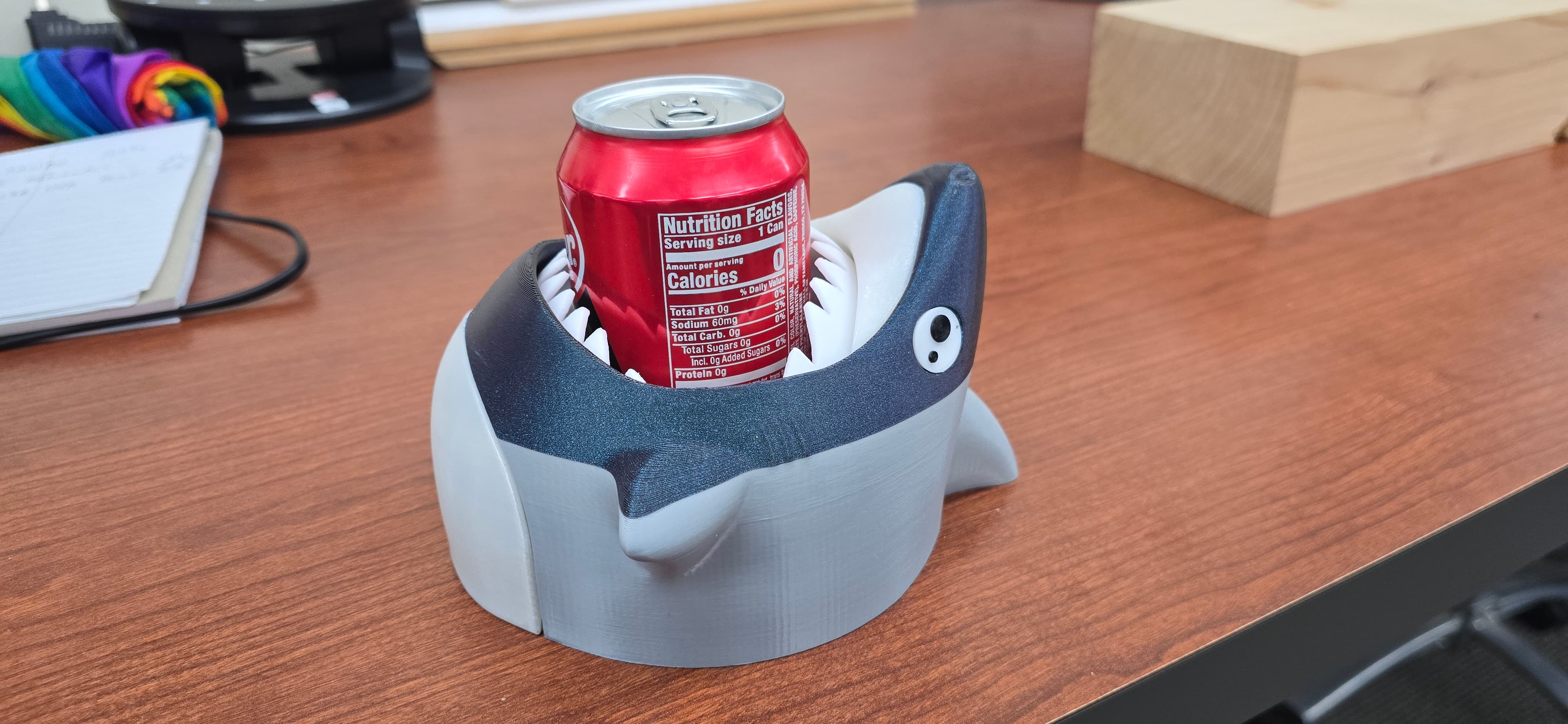
With his spring-free snapping jaw, Stanley locks onto cans and bottles up to Ø 72 mm, guarding every sip like a true ocean predator. Equal parts desk buddy, party trick, and conversation starter, he’s the fiercest drink holder you’ll ever own.
😊 Why You'll Love It:
- 🦈 Turns your drink into a fun ocean adventure
- 🥤 Fits most 250 ml, 330 ml, and 500 ml cans & bottles
- 👁️ Works with both multicolor AMS/MMU prints or simple single-color swaps
- ⚡ Prints in just 5 snap-fit parts with no hardware required
- 🖨️ Single-color model, can be printed on any machine
- 🎉 Makes the ultimate party gift or desk conversation starter
📐 Quick Specs: Fits cans & bottles up to Ø 72 mm (≈ 2.83″)
🎨 Filament Used: Blue-Grey (Get it) • White (Get it) • Beige (Get it) • Red (Get it)
📋 Print Settings: See included README.md for detailed instructions
🎯 New to 3D Printing? Perfect prints guaranteed → Start Here

Stanley the Drink‑Snapping Shark
1.3K downloads · 1 year ago in and
This model is restricted by licensing terms.
View license.

BambooBar - Straw Organizer

PoopPal Corgi - Dog Poopbag Dispenser

Bruce, the Flexi Shark - Magnetic Hand-Holding Companion
Flexi Sloth Branch Dock
Sea Dive Pals

Domino — Dog Treat Edition

Alfie, the Flexi Alligator - Magnetic Hand-Holding Companion

Diego, the Ice Pint Holding Dragon

Sushi Stack — Shoji Box
Sushi Stack — Tumble Tower Game

Luisa, the Flexi Lioness - Magnetic Hand-Holding Companion

Highland Cow Desk Organizer
PMS - Period Missile System - Tampon Pistol

RummyCat - Rummy Game

Taro, the Flexi Tiger - Magnetic Hand-Holding Companion

Egglings – Dinosaur Egg Cup

Sammy, the Ice Pint Holding Sloth

Henriegga – The Chocolate Egg-Laying Chicken
Frankie, the Flexi French Bulldog - Magnetic Hand-Holding Companion

Could you make an alligator version of this? Thanks!
Oh this is amazing, cannot wait to make one for my 5 year old niece!
I've downloaded the file but I can't get the file to open up on my printers software.
please use Bambustudio or OrcaSlicer or PrusaSlicer to open the files. Then you rightclick on the Model and press "Export as STL"
you can still use Ultimaker to slice the model, if you prefer, but you need to use one of the above slicers to export it as STL.
generally i recommend to use the 3mf, since it has all the color data, and slicing settings already applied.
the eyes dont look like the ones in the photo for the raised single color, is it the correct file?
correct, the raised single color version, has the white pupils embossed by 3 layers (0.6mm) but unless you are very closeup, you dont notice the difference
Hi, everything prints fine, but I am having issues with the red plunger. After putting everything together, there seems to be a quite loose fit in the slide mechanism - sometimes getting stuck there. And the brim (not the 3d-printing brim) might need to be a few millimeters wider. Currently it gets stuck relatively often as the plunger's brim is caught by the jaw mechanism, beeing stuck there until one manually / forcefully removes it. all the best!
Hi, I've updated the Plunger, so it is as big as possible, while still sliding up and down. the tolerance for the slide mechanism itself is on purpose rather loose, since i dont want any friction here. if i make it tighter it wont self return in some cases.....
thanks for the feedback, i'll have a look into it, how large i can make the plunger.
I am also struggling to print the teeth. There is something wrong with the teeth on the left side of the model. If you look at the layer type in Bambu Studio the right one has an Outer Wall, Inner Wall, and Gap infill, the left one has an outer wall that's really squiggly and an inner wall. There is a little internal solid infill/gap infill but it's no where near as clean as the right wall.
I included a screenshot of what I'm seeing. https://i.imgur.com/0u5a6UQ.png
It keeps failing on the left teeth. My plate is clean, my first layer is actually amazing since I run at 20mm/s. The little squares supporting the mechanism don't come loose, it's only the teeth on the left side.
https://imgur.com/a/EilueQj - I grabbed one after the first layer too. I hope this helps!
Ok, I've test printed it on 3 machines, with 3 different filaments, and the teeth did come out perfect on all three.
I've uploaded the 3mf file 3_shark_whiteTeeth_EASIER_PRINT.3mf
there i changed the following: Wall Engine: Arachne Avoid Crossing Walls Slowed speed to 100mm/s capped acceleration to 5k
please make sure your buildplate is freshly washed with soap, rinsed and dry.
all the best
sorry this didnt work out for you. first layer looks actually amazing. regarding the squigglyness, i am testprinting a version, where i set the wall generator to Arachne, so it varies the line width.
if this print comes out nicely, i'll update the files
Sounds good! I was able to get it to print finally but I had to slow everything down to 60 mm/s purely because of that side of the teeth and thought this might help figure out the reason why it's failing for us.
Print a lot of mini models so I know it's not plate adhesion issues, without a good solid first layer it always has issues and printing all my first layers at 20 mm/s resolved any first layer issues for me. That's why I thought it was odd that this kept failing over and over again.
I cannot get the teeth to print, I have tried everything, cleaned the plate I don't know how many times. I give-up after 5 tries!
i am sorry it didnt work out for you. since you are not the only one having issue, i am working on, how i can optimize the settings, so it comes out nice for everybody.
i'll update you with the result
Ok, I've test printed it on 3 machines, with 3 different filaments, and the teeth did come out perfect on all three.
I've uploaded the 3mf file 3_shark_whiteTeeth_EASIER_PRINT.3mf
there i changed the following: Wall Engine: Arachne Avoid Crossing Walls Slowed speed to 100mm/s capped acceleration to 5k
please make sure your buildplate is freshly washed with soap, rinsed and dry.
all the best
trying to print the teeth mechanism, having trouble on the floppy levers falling apart while printing, what are the recommended support settings / print speed?
Hi,
please try the following steps:
all the best
Ok, I've test printed it on 3 machines, with 3 different filaments, and the teeth did come out perfect on all three.
I've uploaded the 3mf file 3_shark_whiteTeeth_EASIER_PRINT.3mf
there i changed the following: Wall Engine: Arachne Avoid Crossing Walls Slowed speed to 100mm/s capped acceleration to 5k
please make sure your buildplate is freshly washed with soap, rinsed and dry.
all the best