


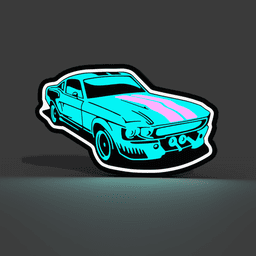


Ford Mustang Car Fan Art Lightbox LED Lamp
Showcase the timeless design of the Ford Mustang with this stunning fan art lightbox. Featuring a beautifully detailed depiction of the iconic muscle car, this LED lamp adds a unique touch of automotive art to your space. Perfect for car enthusiasts or anyone who appreciates classic design, this lightbox will light up your room with style and personality. Display it in your garage, office, or living room for a bold, custom look that celebrates the legacy of the Ford Mustang.
If you don't have or don't want to install LED's you can just glue the parts together and have an awesome sign!
WARNING!
- remove purge line at the beginning of the print, it may interfere, specially with bigger prints!
Materials and tools:
- glue gun
- aluminum tape
- led strip: simple 1m or 2m white or rgb led USB (recommended 60 LED per meter)
- soldering iron (optional)
RECOMMENDATIONS
-
use a textured PEI sheet
-
remove purge line at the beginning of the print!
-
use the print profile, it has quite a few setting changes that help achieve the best results
-
make a hole for the USB strip wherever you like it best with a soldering iron, drill or in the slicer
-
use the aluminum tape on the inside of the backplate to help with light diffusion
-
glue the LED's the further away from the colored design possible; placing them too close ruins the diffusion and the individual LED's become visible
Bambu Studio Settings: I always recommend using the print profile I provided since it has settings with which I've been able to get the best results. If you choose not to here are the main slicer settings I recommend:
- preferences (ctrl + P) → activate developer settings → Quality →Advanced → First Layer Flow Ratio: 1.04 to 1.08
- Quality → Wall generator → Arachne
- Quality → Wall transitioning threshold angle → 30º to 50º
- Strength → Advanced → Infill/wall overlap → 20% to 25%
- Increasing retraction / reducing temperature can help reducing wisps
- Order color printing from lightest to darkest color
How to make a hole in Bambu Studio: https://www.youtube.com/watch?v=OsA23WCxRtg&t=14s&ab_channel=braga3dprint
Assembly video: https://www.youtube.com/watch?v=QNsShLmXYh0&t=8s&ab_channel=braga3dprint
How to print without AMS: https://www.youtube.com/watch?v=RUSTGxOOS_U&t=4s&ab_channel=braga3dprint
Ford Mustang Car Fan Art Lightbox LED Lamp

Stranger Things Lightbox LED Lamp

Skyrim Lightbox LED Lamp

Persona 5 Lightbox LED Lamp

Lumon Industries Severance Lightbox LED Lamp

Tassel Maker

KTM Key Cover

The Rolling Stones Lightbox LED Lamp

Bunny Lightbox LED Lamp

Crimson Desert Lightbox LED Lamp

Oreo Lightbox LED Lamp

LED super mario remastered.step

Kinder Lightbox LED Lamp

Milka Lightbox LED Lamp

Portland Trail Blazers Lightbox LED Lamp

The Last of Us Firefly Lightbox LED Lamp

Valorant Lightbox LED Lamp

Halo Lightbox LED Lamp

Doom Slayer Mark Lightbox LED Lamp

Doom Lightbox LED Lamp
