



Nebula Camera Mount for Ender 3V3 KE/SE - Input-Shaper Friendly
101 downloads · 2 years ago · This is an X-axis mount for the Nebula camera on the Creality Ender 3V3 KE, which accommodates the b
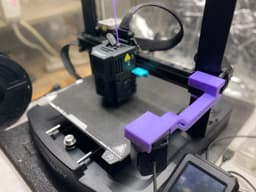
This is an X-axis mount for the Nebula camera on the Creality Ender 3V3 KE, which accommodates the bracket for the Creality Input Shaping Sensor.
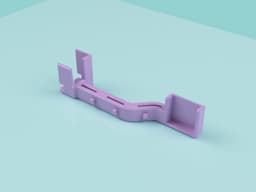
The updated version slots onto the X-axis end-stop with a satisfying click and can be printed without supports. There are clips on the underside of the arm so that the Nebula cable can be routed discreetly.
v27 updates: • increased size of cable clips • increased thickness of top and bottom x-axis supports by 1mm
3D PRINTING SETTINGS:
Filament: Any, prints fine in PLA Time: <90 minutes on Ender 3V3 KE Supports: None Bed adhesion settings: None Positioning: Slice on its side as per the purple example in the main picture

astro305mm9 months ago
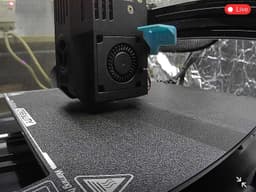
I needed to bend the arm (using low setting on heat gun), in order for it to clear my Nebula Pad as the camera was obscuring a lot of the screen. Also added a small dropper in order to have the Nebula camera sit a bit closer to the build plate so I can see the hot-end nozzle tip. Refer to photos. Very pleased with the result.

PrinterCreality Ender 3 V3 SE
Print bed sizeX: 220 mm; Y: 220 mm; Z: 220 mm
MaterialPLA+
Layer height0.2 mm
Infill density30 %
Nebula Camera Mount for Ender 3V3 KE/SE - Input-Shaper Friendly
101 downloads · 2 years ago in and
%252020.56.58_d256f078.jpg&w=3840&q=75)
Suporte Camera Nebula Ender 3v3

Magic Ball Fidget Toy
Cosmic Star Fidget Toy
Dice Jail / All Hail | Dungeons and Dragons Dice Jail

Magic Ball Kinetic Desk Sculpture

Guardians of the Galaxy Tool Box
Cloud Moon PS5 Controller Stand
AT-AT Star Wars HueForge

Baby Spike Dragon and Crystal Box
Wizard Dice Box
Joystick Fidget Cube
Guardians of the Galaxy Vol 3 Tool Box
Toy skeleton

Mizu the Water Dragon
Creality Nebula Camera Mount for the Ender 3 S1 Plus on the X Axis
Peaches, your Propagation Assistant (002)

3.5-Inch Drone Frame
Heart display stand | Holder for photos, cards, notes and more! | Cute love theme accessory

Butterfly Dragon
