
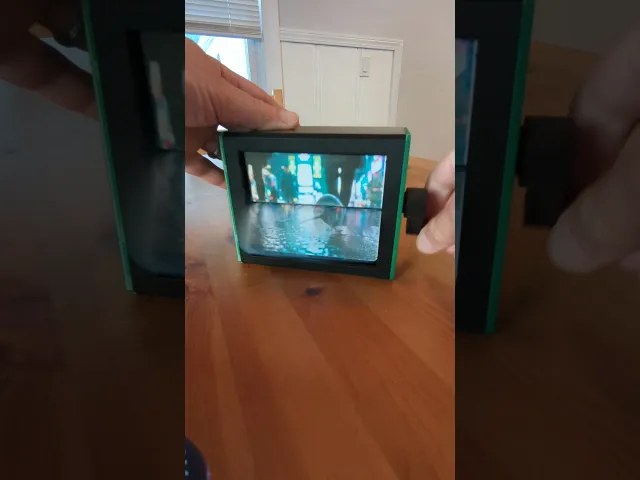


Photo Flipbook Frame
Bring your memories to life with this fully 3D printable, hand-cranked flipbook box. Turn a favorite video clip from your last vacation, a series of family photos, or even your own stop-motion drawings into a tangible, interactive experience you can hold in your hands.
Key Features
- Fully 3D Printable: Every part of the box and mechanism can be printed at home.
- Smooth Hand-Cranked Action: A simple, reliable mechanism provides a satisfying flipping motion.
- 12-Image Capacity: Designed to perfectly loop a sequence of twelve photos or frames.
- Simple Assembly: The parts are designed to be intuitive and easy to assemble.
How It Works - 4 Easy Steps
- 3D Print the Parts: All components are optimized for easy printing on a standard FDM printer.
- Format Your Images: Use the free PhotoFlip Label Creator tool (link below) to automatically format your 12 photos or video frames.
- Print Your Labels: Print the PDF from the tool at 100% scale onto your label sheets.
- Assemble & Enjoy: Stick the labels to the flaps, follow the assembly guide, and enjoy your mechanical memory!
Required Materials
- 3D Printer and filament of your choice.
- 4.00" x 3.33" Sticker Labels. I used these exact labels from Amazon and they worked perfectly.
IMPORTANT: The Free PhotoFlip Label Creator Tool To make this project as easy as possible, I've created a custom web tool that does all the hard work for you.
Link: https://photofliptool.netlify.app/
This tool is required to correctly format your images. It will:
- Accept 12 individual photos or a short video clip.
- Automatically split the images in half for the flaps.
- Sequence them correctly for the looping effect.
- Generate a perfect, print-ready PDF.
CRITICAL NOTE: When you print the PDF, you MUST set your printer's scaling to 100% or "Actual Size". Do not use "Fit to Page," or the labels will not align correctly.
Recommended Print Settings
- Layer Height: 0.2mm
- Infill: 10%
- Supports: Required for Main Body, End Plates, Shaft, & Crank
Make It Yours Become a SoloPrototype Member on Thangs to get exclusive access to the native Fusion 360 files for this design (available soon). This allows you to modify, customize, and even sell your own physical prints.
Photo Flipbook Frame
CandyGat PZ11 - PEZ Shooter
POLAROID PHOTO FRAME / PHOTO STAND / VALENTINES GIFT / MODERN HOMEDECOR / DECORATIONS

MOTHERSDAY POLAROID PHOTO FRAME / PHOTO STAND + MAGNETIC VERSION / MOTHERSDAY GIFT / GIFT FOR MOTHER

Memorial Frame Display STL | In Loving Memory Photo Frame | Pet Memorial | Remembrance Decor | 4x6

Quadruple 7x7 Photo Frame with Keyholes

Bone Heart Photo Frame on Stand – Gothic Spider Web Picture Frame, Dark Romantic Display Decor

Dual Horizontal 7x7 Photo Frame With Keyhole

Japanese Design Instax Mini Photo Frame | Self-Standing Table & Wall Display | Kumo

Modern 3D Printable Photo Frame Kumo for 90x130mm Picture Size

Easy Print Photo Frame Kumo for 50x70mm Images

Modern 3D Printable Photo Frame Bloom for 50x70mm Images

Snap-Fit Photo Frame Bloom for 90x90mm Images

Modern Desk & Wall Photo Frame Kumo for 90x90mm Pictures
INSTAX PHOTO HINGED FRAME - VALENTINES DAY (2 slots) (print in place)

Beginner-Friendly 3D Printable Picture Frame Bloom for 105x150mm Photos, Din A6, Postcards

Modern Japanese Style Picture Frame with Clean Geometry for 105x150mm Photos, DIN A6 Postcards, STL

Picture Frame Bloom with Desk Stand & Wall Mount for 90x130mm Photos Printable

Fang Picture/Mirror Frame

Square Ribbed Planter and Photo Holder

Wow this is great! Thank you so much for making this available for free printing! I will be printing this for my girlfriend soon.
Thank you! I'm glad you like it 🙂 I haven't heard much about it so anyone appreciating it means a lot to me 🙏