
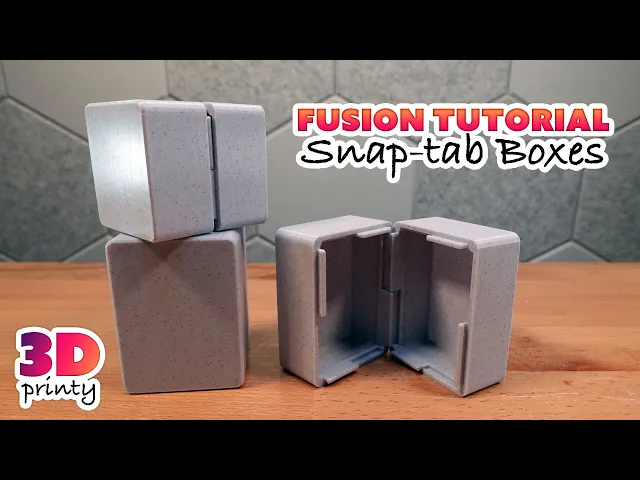


Snap-tab Box (Autodesk Fusion Tutorial)
A tutorial model demonstrating how to model snap-tabs in Autodesk Fusion for glue-free and zero hardware assembly.
**Once closed, this box will not open again without extreme measures. **
Printing
- Print two copies for a complete box
- No supports or brim required
- Avoid brittle filaments - the tabs must flex slightly during assembly
Assembly
- Line up two copies of the print so that the raised tabs on one side line up with the recesses on the other end.
- Press body prints together. Use a clamp if necessary.
Can I sell copies of this?
Yes! This project was shared under the Creative Commons - Public Domain license.
This license grants you permission to download, distribute, alter, print, and sell copies of this design.
This license applies only to the model files (STL, 3MF, STEP, F3D) included in this project. It does not apply to photos, videos, my logo, or other supplemental graphics attached to or displayed with this project.
Attribution Text
This license does not require attribution. But if you choose attribute my work, feel free to use the following text.
"Snap-tap Box" (https://3dprinty.xyz/project/144) is designed by 3D Printy (https://3dprinty.xyz) and shared under a Creative Commons Public Domain (CC 0 1.0) license (https://creativecommons.org/publicdomain/zero/1.0/).
Snap-tab Box (Autodesk Fusion Tutorial)

Premium 10ml Snap Box – STEP + Remix Files Included
.jpg&w=3840&q=75)
Heart Shaped Box (Snap)
Minimalist Tissue Box Cover – Snap-On Lid | 3D Printable

Valentines Day Ring Boxes 100% 3D Printed; PACKAGE OF 4

Premium Modular Vial Box – Includes STEP + Multi-Profile
Cold Storage (Cards, Watch display, Generic storage)

Not So XL Girl Elf

XL Girl Elf

Customisable Travel box
IKEA SKADIS TOY DISPLAY BOXES
Dastardly Dovetail Box (Round Magnetic)

Poker Chip Fidget – 3D Printable Spinning Magnet Toy

10ml 2x2 Box – Premium Remix Edition

ModBot Accessory Pack 2 - Workshop & Tools Bundle
Pencil Sharpener Tissue Box

In Case of Emergency: Cigarette & Lighter Edition

Milwaukee Style, Packout, Sunglasses Case; print in place,

Easter Carrot Box
MARVEL Tesseract 1:2 to fit SHIELD and Hydra Tool Boxes
